

Ans: An unresponsive iPhone screen can be caused by many reasons, such as internal hardware damage, software glitches, or moisture exposure.
iPhone Touch Screen Not Working? Step-by-Step Troubleshooting Guide
An iPhone screen not responding to touch can turn an everyday task into a frustrating experience, such as difficulty navigating between apps, answering calls, or sending text messages—something users commonly face across modern smartphone repair scenarios.
This problem may stem from software issues, like system bugs, outdated versions, or app conflicts, as well as hardware concerns, such as a cracked screen, loose internal components, or moisture exposure—issues similar to those seen during advanced iPhone repair services.
While some situations can be resolved with basic DIY troubleshooting, professional service is often necessary to ensure reliable performance and long-term results.
At DeviceFixes, certified technicians provide accurate diagnostics and dependable repair solutions to restore full functionality, whether it’s an iPhone, Android, or even complex tablet repair cases. Thus, read on to explore safe DIY steps you can try, and also learn when it is best to consult DeviceFixes for expert repair and lasting performance.
Table of Contents:
- Quick Fix Checklist for iPhone Screen Not Responding to Touch
- Why Is My iPhone Screen Not Responding to Touch?
- Signs Your iPhone Touch Screen Is Not Working Properly
- Why Basic DIY Fixes Don’t Always Work?
- Professional iPhone Screen Repair Services by DeviceFixes
- Conclusion
- Frequently Asked Questions (FAQs)
Quick Fix Checklist for iPhone Screen Not Responding to Touch
In this section, we have illustrated some effective fixes that are safe, non-technical, and won’t harm your phone in any way. Check them out thoroughly to resolve your concern, “iPhone screen not responding to touch.”
1. Restart or Force Restart Your iPhone
Restarting your device is one of the simplest yet most beneficial ways to resolve the phone screen unresponsive issues. This step is often effective across multiple devices handled under professional smartphone diagnostics.
- For a few seconds, press and release the volume up button of your device.
- Again, press and release the volume down button.
- Press and hold the side button.
- Once the Apple logo appears on your screen, release the side button.
2. Clean and Dry the Screen
Sometimes, dirt or oily particles on our device reduce screen performance. Before contacting a technician who handles advanced iPhone repairs, try the steps below.
- Take a soft, clean cotton cloth and make it drip with a screen cleanser.
- Gently wipe your screen and leave it for a while.
Remember, don’t wipe the screen for more than a few seconds, and once you are done, wipe it again with the dry side of the cloth.
3. Remove Screen Protector or Phone Case
A cracked screen protector or low-quality phone case can interfere with touch sensitivity. Removing accessories is often recommended in professional Samsung and iPhone troubleshooting alike.
Besides, if your iPhone screen freezes and won’t respond to touch, adhere to the steps mentioned below to remove the screen protector effortlessly, without damaging your device.
- Turn off your device to avoid any accidental touches.
- Take the hairdryer, set it on its lowest temperature setting. Place it at least 6 inches away from your screen and move it back and forth for 15–20 seconds to warm and loosen the adhesiveness of your screen protector.
- Peel off the protector from the side using your fingernail, and once it is up, slowly drag it upwards and remove it completely.
- After removing the screen protector, if any adhesive particles are left, rub them with a microfiber cloth wet with alcohol and wipe until clean.
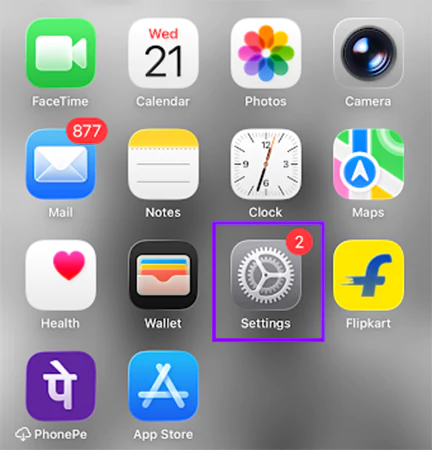
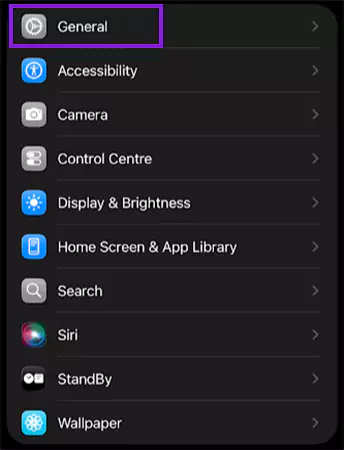
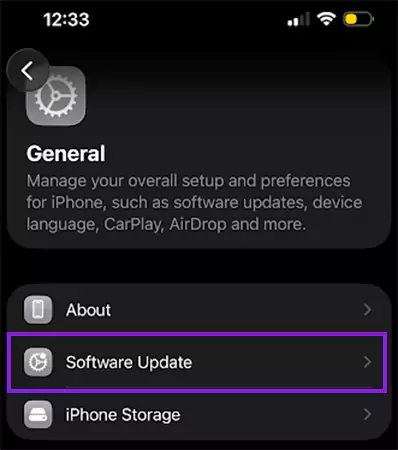
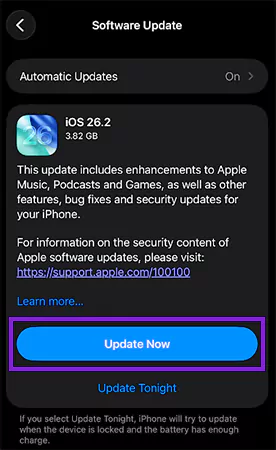
4. Update iOS to the Latest Version
Using an outdated version may contribute to the iPhone touch screen not working issue. Software-related fixes like this are commonly applied during mobile phone servicing.
- Locate and tap on the Settings icon on your device.
- Go to the General option.
- Tap Software Update.
- Tap on the Update Now (if any), and follow the screen instructions to complete the process.
5. Reset iPhone Settings (No Data Loss)
If nothing works, resetting your iPhone settings may clear unnecessary caches or bugs. This step is similar to resets used in professional Google Pixel repairs and other smartphones.
Here are the steps for your query, “How to fix iPhone screen?” Check them out.
- Go to the Settings on your device.
- Locate the General option.
- Scroll down and locate the Transfer or Reset iPhone.
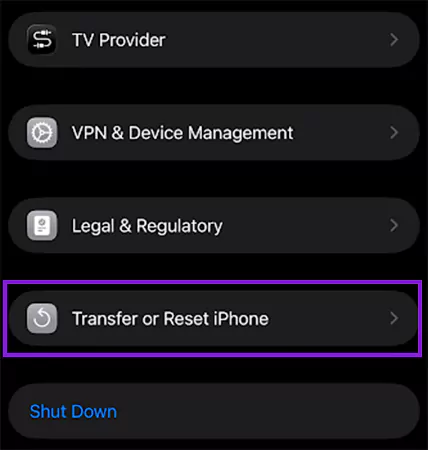
- Opt for the Reset option.
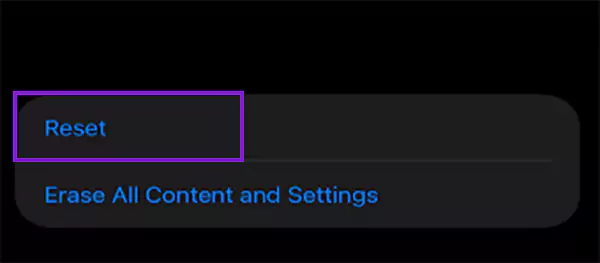
- Tap on the Reset All Settings to give a fresh start to your device while keeping your personal data untouched.
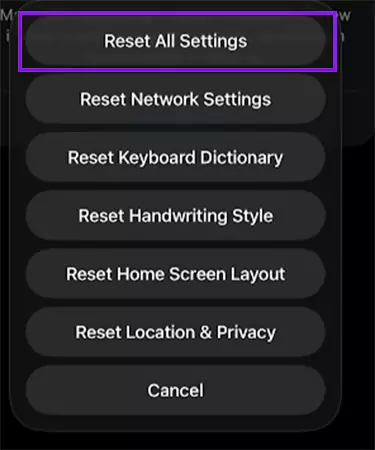
Consequently, by performing the above-mentioned fixes, you can surely resolve your iPhone touch screen not working problem within a few minutes and, notably, without spending a penny.
Why Is My iPhone Screen Not Responding to Touch?
There can be several reasons behind your iPhone screen being unresponsive, including software bugs, hardware malfunctions, or physical factors—similar to issues seen during laptop and PC diagnostics.
Examine the following sections to comprehend the potential cause and determine why your iPhone touch screen not working.
1. Software-Related Causes
Software issues such as system glitches or app conflicts are common across devices, including those requiring Mac repairs.
- iOS Bugs or System Glitches: Using your device without updating or clearing unnecessary data for a long time can lead to unwanted bugs or system glitches in your device. Try to remove unused or duplicate files and try to keep your iPhone storage clutter-free.
- App Conflicts or Frozen Background Processes: Sometimes, various third-party apps or unverified APK applications slow down the system’s performance. Avoid using any unauthorized apps and delete APK files once you install the app for better performance.
- Touch Issues After an iOS Update: Incompatibility with aftermarket screens, background re-indexing, temporary software glitches, and low storage are some common reasons that may cause your phone screen to be unresponsive after an update. To fix this, you can try to update your device again or force restart it to improve the performance.
2. Hardware-Related Problems
Hardware faults often require professional intervention, much like complex computer hardware repairs. Take a look.
- Damaged or Failing Digitizer: The damaged or failing digitizer may cause the iPhone screen unresponsive to touch or may result in the ghost tap. The only solution to this problem is complete screen replacement.
- Loose or Disconnected Internal Display Cables: If your device screen turns black, contains vertical lines, or some parts are unresponsive, it may be because of the loose or disconnected internal cables. You may contact a hardware specialist to fix the error as soon as possible.
- Complete Display Assembly Failure: To fix this damage, you may have to consult a hardware expert or Apple service center. Also, the repair may cost you up to $100–$400, depending on the model and extent of the repair.
3. Physical & Environmental Factors
Environmental damage affects many electronics, from phones to game consoles. For instance:
- Accidental drops or impact damage.
- Water or moisture exposure to the screen.
- Overheating or prolonged high-temperature use.
Signs Your iPhone Touch Screen Is Not Working Properly
Recognizing early signs can help avoid major repairs similar to advanced data recovery scenarios. Thus, check them out.
- iPhone Screen Unresponsive to Touch: Whether the entire screen or a small part of the screen is not responding to your fingerprint, you need to quickly determine the cause and fix it.
- Screen Freezes Randomly: While using or switching between apps, if your iPhone screen freezes and won’t respond to touch randomly, it can be because of internal hardware damage or software glitches. You must immediately try DIY fixes to resolve this issue before it turns into something major.
- Ghost Touches or Unintended Taps: Whether you are facing ghost touches or unintended taps, both are signs that your iPhone screen is not performing well. However, you can resolve these issues with some common DIYs like force restarting, removing the screen protector, or resetting device settings.
Why Basic DIY Fixes Don’t Always Work?
DIY fixes may not resolve deeper issues involving internal components—problems often seen in professional tablet repairs and smartphones. Additionally, below are some causes that might not be treated by DIY only and require professional help.
- Internal Hardware Damage: Problems with internal connections, processors, or motherboards cannot be fixed through software. Its fixes may require expert skills and knowledge.
- Digitizer Failure: Ghost touches, unresponsive spots, unidentifiable vertical lines, or a black screen are some primary symptoms of digitizer failure. This can only be fixed by a complete screen replacement.
- Liquid Damage: Moisture or water exposure to your screen may lead to internal corrosion, which can be one of the prominent reasons why your iPhone screen not responding to touch. You can try some DIY alternatives first, but if it doesn’t work, do not delay seeking professional help.
- Accidental Drop Damages: After an accidental drop or impact damage, internal connectors or display cables may get misaligned, loosened, or disconnected, which requires a thorough hardware repair and cannot be handled by the usual DIY methods.
Professional iPhone Screen Repair Services by DeviceFixes
DeviceFixes provides expert repair solutions for a wide range of devices, including smartphones, tablets, laptops, and even gaming consoles.
- iPhone 6 / 6s / 7 / 8
- iPhone X / XR / XS / XS Max
- iPhone 11 / 12 / 13 / 14 / 15 series
- iPhone SE (all generations)
Furthermore, below, we have presented our services along with the primary reasons why you should give us a chance to assist you
1. What does our iPhone Screen Repair Cover?
Here are a few major services that we provide to our customers; take a look.
- iPhone screen unresponsive to touch.
- Cracked or broken displays.
- Digitizer replacement.
- Water-damaged iPhone screens.
2. Why Choose DeviceFixes?
Evidently, there are numerous iPhone service providers in the market, but with an expert team, we stand tall above all of them. Here are some key aspects of our services that you should consider when deciding why you should choose DeviceFixes; take a look.
- Certified and Experienced Technicians: We have a team of certified technicians who hold years of experience in repairing all sorts of iOS devices, ensuring instant assistance for our customers.
- Genuine or OEM-Grade Replacement Parts: As your iPhone repairing assistant, we assure you that we will provide genuine or OEM-grade replacement parts at the most affordable price.
- Same-Day Service (Model Dependent): We deliver robust service and promise to resolve issues such as an iPhone screen not responding to touch, ghost taps, or vertical lines within the same day, depending on your iOS device.
- Warranty-Backed Repairs: Provides an extended warranty on our repairs so that you can enjoy using your device for a long time without stressing about the service cost.
Conclusion
When your iPhone screen is not responding to touch, the cause may range from software glitches to internal hardware damage. While temporary fixes may help, professional repair ensures long-term performance and device safety—just as it does for advanced OnePlus and Motorola repairs.
At DeviceFixes, our certified technicians deliver accurate diagnostics and reliable repairs to restore full functionality to all sorts of iPhone models.
So what are you waiting for? Book your professional diagnosis today and get instant expert support to fix your iPhone at an affordable price.
Frequently Asked Questions (FAQs)
Q: Why is my iPhone screen not responding to touch suddenly?
Q: Can an iOS update fix an unresponsive iPhone screen?
Ans: Yes, if your iPhone screen freezes and won’t respond to touch because of any software glitch, it can be fixed by updating your device. However, if the cause is something related to hardware or internal wires, the update won’t resolve the problem.
Q: How do I know if my iPhone digitizer is damaged?
Ans: If your iPhone touch screen not working, has vertical lines, ghost taps, or is unresponsive at some particular point, this can be because of a damaged digitizer.
Q: Is it safe to keep using an iPhone with an unresponsive screen?
Ans: No, using an iPhone not responding to touch for a long time can worsen the device’s performance or may cause the loss of stored data in it, which cannot be retrieved or fixed later.
Q: How long does iPhone screen repair take at DeviceFixes?
Ans: Our expert team with excellent skills and years of experience ensures same-day service availability, depending on the model and complexity.
Sources:
Force Restart iPhone: iPhone User Guide
Update iOS on iPhone: iPhone User Guide
Reset iPhone Settings (No Data Loss): Apple Community