
Ans: For the regular iPhone 17, the recommended size is 1206×2622 pixels, but for the iPhone 17 Pro Max, it is 1320×2868 pixels.
iPhone Wallpaper Dimensions: Complete Guide to iPhone Wallpaper Size & Resolution
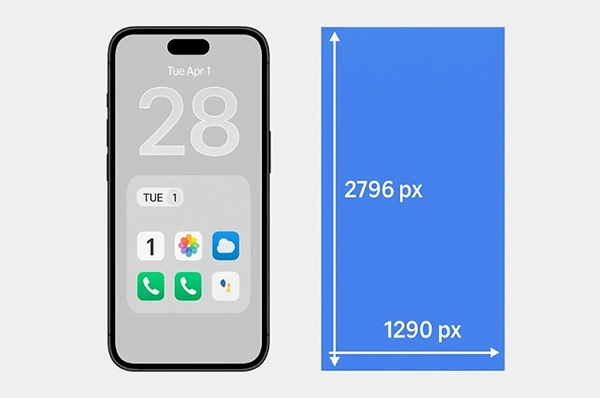
The recommended iPhone wallpaper dimensions are said to be 1290×2796, but each model uses a different dimension. Correct dimensions and resolution for your iPhone wallpaper will reduce cropping issues, low-resolution image quality, and misalignment.
This article provides the dimensions of each iPhone wallpaper (as well as the dimensions of the iPhone model), the aspect ratio for every wallpaper, and the dimensions for each iPhone model, as well as practical tips for optimizing for use on both the home screen and the lock screen.
Table of Contents:
What is the Ideal iPhone Wallpaper Size and Resolution?
The best iPhone wallpaper dimensions are equal to or just above your device’s native resolution (displayed). iPhone models use very high-resolution (OLED) screens, so it is necessary to use high-quality, sharp photos when selecting your background image.
Here are the latest requirements for modern iPhones:
- iPhone 17 Pro Max: 1320×2868
- iPhone 17 or 17 Pro: 1206×2622
- iPhone 16 Pro Max: 1320×2868
Using your wallpaper photos at or above the listed resolutions will ensure you have nice, clear images without any pixelation. Especially if you are using an OLED screen.
Apple also adds to the effectiveness of the wallpapers by having a perspective zoom effect that enlarges the wallpaper slightly. Therefore, if you want to prevent unwanted cropping and preserve the composition of your background images, use photos that are larger than the exact resolution.
iPhone Wallpaper Dimensions by Model (Updated)
iPhone wallpaper dimensions are different in each of its models. Take a look at the table below:
| Model | Pixels |
| iPhone 17 Pro Max | 1320 × 2868 |
| iPhone 17 Pro | 1206 × 2622 |
| iPhone 17 | 1206 × 2622 |
| iPhone Air | 1260 × 2736 |
| iPhone 17e | 1170×2532 |
| iPhone 16 Pro Max | 1320 × 2868 |
| iPhone 16 Pro | 1206 × 2622 |
| iPhone 16 | 1179 × 2556 |
| iPhone 16 Plus | 1290 × 2796 |
| iPhone 15 Pro Max | 1290 × 2796 |
| iPhone 15 Pro | 1179 × 2556 |
| iPhone 15 | 1179 × 2556 |
| iPhone 15 Plus | 1290 × 2796 |
| iPhone 14 Pro Max | 1290 × 2796 |
| iPhone 14 Pro | 1179 × 2556 |
| iPhone 14 | 1170 × 2532 |
| iPhone 14 Plus | 1284 × 2778 |
| iPhone 13 Pro Max | 1284 × 2778 |
| iPhone 13 Pro | 1170 × 2532 |
| iPhone 13 | 1170 × 2532 |
| iPhone 13 mini | 1080 × 2340 |
| iPhone 12 Pro Max | 1284 × 2778 |
| iPhone 12 Pro | 1170 × 2532 |
| iPhone 12 | 1170 × 2532 |
| iPhone 12 mini | 1080 × 2340 |
| iPhone 11 Pro Max | 1242 × 2688 |
| iPhone 11 Pro | 1125 × 2436 |
| iPhone 11 | 828 × 1792 |
| iPhone XS Max | 1242 × 2688 |
| iPhone XS | 1125 × 2436 |
| iPhone XR | 828 × 1792 |
| iPhone X | 1125 × 2436 |
| iPhone 8 Plus | 1080 × 1920 |
| iPhone 8 | 750 × 1334 |
| iPhone 7 Plus | 1080 × 1920 |
| iPhone 7 | 750 × 1334 |
| iPhone 6s Plus | 1080 × 1920 |
| iPhone 6s | 750 × 1334 |
| iPhone 6 Plus | 1080 × 1920 |
| iPhone 6 | 750 × 1334 |
| iPhone SE | 640 × 1136 |
| iPhone 5s | 640 × 1136 |
| iPhone 5c | 640 × 1136 |
| iPhone 4s | 640 × 960 |
| iPhone 4 | 640 × 960 |
| iPhone 3GS | 320 × 480 |
| iPhone 3G | 320 × 480 |
| iPhone (1st generation) | 320 × 480 |
ALSO READ: PC Screen Lines: Causes, Fixes & When You Need Professional Repair
Why Wallpaper Size Matters
The way a wallpaper will look on your phone is affected by both its resolution and aspect ratio, and the newer iPhone models all have taller screens than before, requiring different design styles from prior generations. The sizes can change even with new upcoming updates.
19.5:9 Aspect Ratio
Modern iPhone wallpaper dimensions have an aspect ratio of 19.5:9 as a standard due to their taller edge-to-edge displays, which allows for wallpapers to fit the iPhone’s screen with no black bars or cropping.
While iPhone wallpaper resolution follows a consistent 19.5:9 aspect ratio, Samsung devices may vary depending on the model, which is one of the key differences highlighted in iPhone vs Samsung comparisons.
This format also lends itself well to portraits and images that make use of the extra height of the display in a vertically aligned manner, providing practical benefits when using your iPhone in daily life:
- Provides a full-screen fit to your iPhone’s display without distortion or cropping
- Works well for portraiture, gradient-based, and center-focused
- Keep critical items visible on both your lock and home screens
- Create depth and enhance visual balance on tall displays
16:9 Aspect Ratio
The 16:9 iPhone wallpaper measurement ratio can be seen in the older device displays and videos; these are not well-suited for today’s iPhones. When used as wallpaper, they typically need to be zoomed in or moved around to fill in gaps, which may cause important elements of the image to be cropped out or lost.
Even though 16:9 is less ideal for modern iPhones, some Android devices still support or adapt better to such formats, depending on the Android latest version. Here are some limitations or considerations to consider:
- May need to manually zoom to fit properly on iPhone
- May lead to cropping pieces off the edges of the picture
- May fit/suit the wallpaper on a landscape-style or simplistic picture, with a large enough margin of safety
Best Practices for High-Quality iPhone Backgrounds
Designing and creating high-quality wallpaper for iPhone size involves two things: proper design and resizing correctly. For images to be effective as wallpapers, they need to be resized to match the resolution of the device with the same aspect ratio to avoid cropping or distortion.
Small images that are stretched too much will cause pixelation, or loss of detail; therefore, do not overly stretch them during the editing process. To consistently achieve this:
- Use high-quality images, ideally 4k or at the user’s device resolution, to achieve a sharp wallpaper
- Use the proper aspect ratio of an image while resizing it; otherwise, it will distort.
- Export images at a high quality after editing to achieve maximum clarity.
- Never stretch an image that is smaller than the size you would use on a wallpaper, because this will create pixelation.
- Keep the design simple and uncluttered, so users have clear visibility of their icons.
- Uses complementary colors for the user’s app icons.
iPad Wallpaper Size and Dimensions
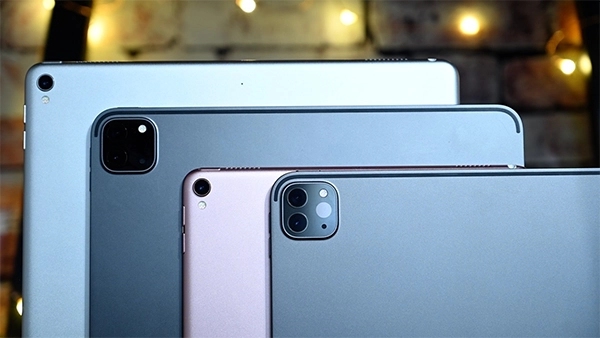
Here are the dimensions of the latest iPads. Take a look at the table below:
| Model | Resolution |
| iPad Pro 12.9-inch M2/M4 | 2048×2732 |
| iPad Air 13-inch M2 | 2048X2732 |
| iPad 10th Gen | 1640×2360 |
| iPad Mini 6 | 1488×2266 |
Mac Wallpaper Size
Mac dimensions and resolutions are way different compared to iPads and iPhones because of the difference in screen size.
| Model | Pixels |
| MacBook Pro 16-inch M3/M4 | 3456×2234 |
| MacBook Air 15-inch M2/M3 | 2880X1864 |
| iMac 24-inch | 4480×2520 |
ALSO READ: How Do You Turn Safe Mode Off on an Android? (Step-by-Step Guide)
Conclusion
To ensure that you have an iPhone wallpaper for the iPhone 16 and iPhone 17 that fits well and has a good resolution, the ideal size of your wallpaper will be at least a little bit bigger than the actual resolution of the device, and have a ratio of 19.5:9.
This will give you sharp pictures, correct alignment, and no cropping issues. You will want to choose high-quality, portrait-oriented images with a centered subject to get the best results, as this will make your wallpaper look clean, clear, and fully compatible with the new iPhone’s screen.
FAQs
Q. What is the wallpaper size for iPhone 17?
Q. What is the wallpaper size for iPhone 16?
Ans: In case you have an iPhone 16, you need to use a wallpaper with a size of 1,179 × 2,556, and for the 16 Pro Max, use 1,320 × 2,868.
Q. Can I use 1920×1080 wallpapers on an iPhone?
Ans: While 1920×1080 wallpapers can be used for an iPhone, they are not recommended or ideal for it because they are over the limit of the usual recommended size.
Q. Why do iPhone wallpapers zoom automatically?
Ans: If the image aspect ratio does not match the screen, iOS automatically crops it out so that it fits the screen perfectly. It’s a built-in feature.
Q. What format is best for wallpapers?
Ans: JPG is the best format for wallpapers because they offer high quality, small file sizes, and good visual appearance.