
Ans: Yes, Nintendo still offers free repairs for drift in some regions, even outside warranty, depending on local policies.
Nintendo Joy-Con Repair: Complete Guide to Fixing Joy-Con Drift
Nintendo Joy-Con repair can be done simply by recalibrating the joystick, cleaning the Joy-Con Joystick, updating Nintendo Switch firmware, or with DIY Nintendo Joy-Con repair. Many customers have had issues like drift buttons or connectivity issues, which are caused by dirt and dust buildup, wear plus tear on the controller itself, or sometimes software problems.
In this write-up, I’ll be mentioning the best ways for Nintendo Joy-Con repair. The mentioned solutions are quite easy to follow, and they can solve the issues that you might be having. But just in case they don’t, it would be best for you to opt for a professional service.
Table of Contents:
- Understanding the Nintendo Switch Joy-Con Controller
- What Is Joy-Con Drift?
- Common Nintendo Joy-Con Problems
- What Causes Joy-Con Drift?
- How to Fix Joy-Con Drift?
- DIY Joy-Con Repair
- Nintendo Joy-Con Repair Program
- When Joy-Con Repair Requires Professional Help
- Joy-Con Repair vs Buying New Controllers
- Nintendo Switch Accessories
- Preventing Future Joy-Con Problems
- Is Nintendo Joy-Con Repair Worth It?
- FAQs
Understanding the Nintendo Switch Joy-Con Controller
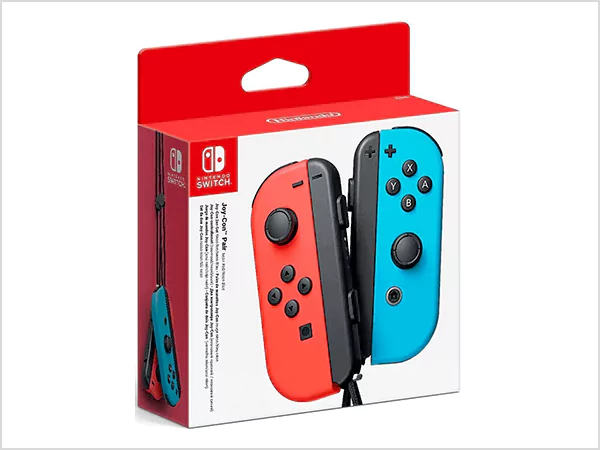
The Joy-Con controller from Nintendo Switch is a small, detachable controller system that provides flexibility and portability. Each Joy-Con can be used as an individual controller or combined with a second Joy-Con to create a full controller layout. Even though they are designed to be technologically sophisticated, they are very likely to have physical wear as well as other potential internal problems because of their small size.
What Is a Joy-Con Controller?
A Joy-Con controller is a detachable gamepad for the Nintendo Switch console.
- The left joystick allows for character movement as well as inputting directions.
- The right joystick controls in-game actions, the game camera, and main gameplay.
- Both joysticks feature motion sensors, which enhance the player’s immersion when gaming.
Key Joy-Con Hardware Components
Having a good grasp of hardware is critical to properly repairing a Nintendo Joy-Con, knowing where a problem is coming from then allows for the right solution to be implemented. Components found inside the controller work together for optimal performance and responsiveness.
- Analog Stick: The analog stick is responsible for motion and direction on-screen. It is the most frequently troubled component of the controller where “drifting” occurs due to age or dust accumulation.
- Buttons and Triggers: Buttons and triggers are responsible for action within a game. They may not work properly due to wear caused by continual use or damage to internal parts.
- Motion Sensors: Motion sensors allow for realistic gaming by detecting tilt and movement. If improperly calibrated, they may cause problems with the functionality of the Joy-Con.
What Is Joy-Con Drift?
With Joy-Con drift, your controller detects motion through the joystick even if you aren’t touching it. Your character will move automatically, your camera may move unexpectedly, and your cursor will drift even when not being touched.
Once you have worn down the parts of your Nintendo Switch joystick (dirt, grime, or calibration problems), your Nintendo Switch joystick may send the wrong signal that causes your Joy-Con to drift.
ALSO READ: How to Fix a Slow Computer: Simple Fixes That Actually Work
Common Nintendo Joy-Con Problems
Joy-Con controllers can experience Joy-Con drift, connectivity issues, battery or charging problems, and sometimes the buttons on the controller stop responding. These affect the way the controller works. Here are the most common Joy-Con issues and what they indicate:
Joy-Con Drift
Joy-Con drift is noticeable when a character or the camera moves without any direct input from the user’s joystick. Joy-Con drift results from either of the following reasons.
- The analogue sticks have deteriorated after many uses
- Build-up of dust around the analogue stick
- Failure of a sensor on the controller that limits input accuracy.
Joy-Con Not Connecting
Joy-Con controllers will not connect to the console or, if connected, will frequently disconnect (and reconnect) from the console.
The causes of connection problems with Joy-Con controllers include Bluetooth interference between devices, low battery, and the firmware of the controller being outdated. There could be an internal issue with the Joy-Con controller that prevents it from maintaining a stable connection.
Buttons Not Responding
The buttons on controllers may be non-functional or may have become slow to respond while playing. The main causes for buttons on Joy-Con controllers becoming unable to function include:
- Build-up of dirt on the button contacts
- Worn-out contacts for the buttons
- The internal components of the Joy-Con controller have sustained damage, which affects the proper signal working properly to send the input.
Battery or Charging Issues
Joy-Con controllers can neither charge properly nor hold enough power for extended periods of time due to one of the following issues:
- Deterioration of the battery inside of the controller
- Defective or damaged charging rails on the controller
- Defective or damaged charging base or dock for the Nintendo Switch console.
What Causes Joy-Con Drift?
Let’s take a common cause that leads to JoyZ-Con drift.
| Cause | Explanation |
| Dust Buildup | Blocks joystick sensors |
| Wear and Tear | Analog stick degradation |
| Moisture Exposure | Internal corrosion |
| Firmware Bugs | Software calibration issues |
How to Fix Joy-Con Drift?
Nintendo Joy-Con repair can be done by recalibrating the joystick, ensuring that the joystick is clean, and updating the firmware. These are just some basic things that you can do by yourself. Here’s how to do it:
Recalibrate the Joystick
Use Nintendo system settings to recalibrate:
- Go to System Settings.
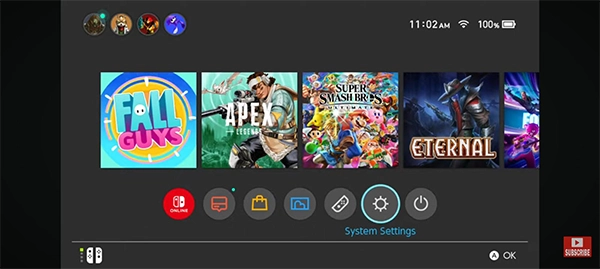
- Select Controllers and Sensors.
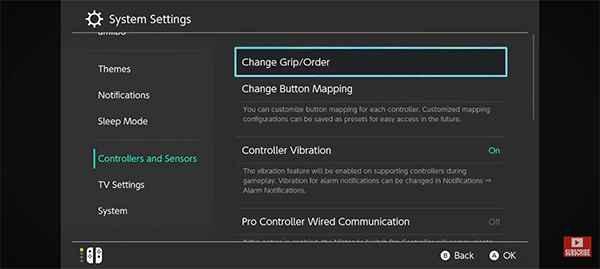
- Choose Calibrate Control Sticks.
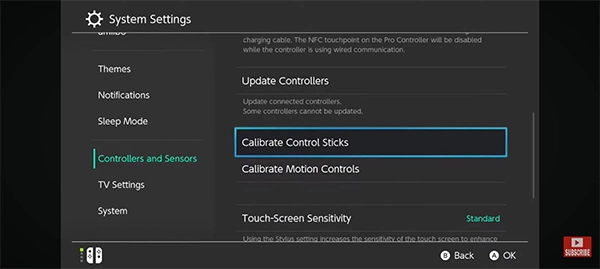
This often fixes minor drift issues.
Clean the Joy-Con Joystick
Sometimes a simple cleaning can result in Nintendo Joy-Con repair.
- Use compressed air or isopropyl alcohol
- Clean around the joystick edges carefully
- Avoid excessive liquid
Update Nintendo Switch Firmware
Installing the latest system update can fix software-related drift issues and improve controller performance.
Steps to update Nintendo Switch software:
- Make sure that you are connected to Wi-Fi.
- Go to System Settings from the home screen and scroll down to select System.
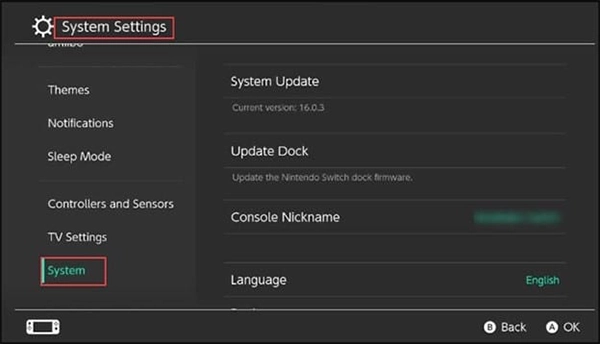
- Tap on “System Update.”
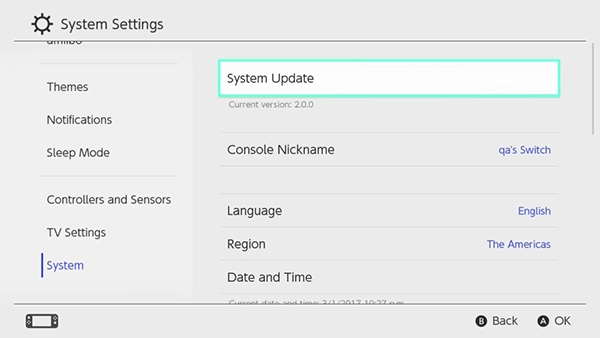
- Wait while the console checks for updates.
- If an update is available, select Update and install it
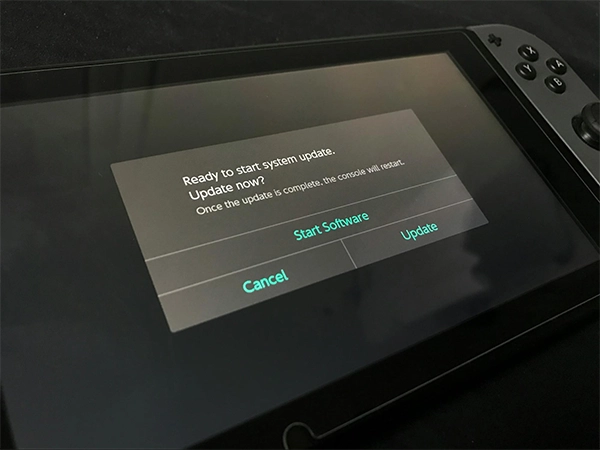
- Restart the console after the update completes.
This ensures your Joy-Con controller works with the latest bug fixes and system improvements.
DIY Joy-Con Repair
Nintendo Joy-Con repair can be accomplished at home with the “do-it-yourself” method, which is a cost-effective way of repairing a Nintendo Switch controller (for example, drift). However, the process requires careful handling of the controllers and the use of the right techniques so that no additional damage is done to them.
- You will need a precision screwdriver (tri-wing and Phillips screwdriver) and a plastic pry tool in order to open the Joy-Con and not damage the outside casing.
- In order to successfully repair your Joy-Con, you need to have a proper quality joystick as a replacement for your Nintendo Switch.
The basic process of repairing a joystick consists of
Opening the Joy-Con properly, disconnecting the battery, removing the broken joystick from the Joy-Con, and installing the replacement joystick into the Joy-Con. After installation, make sure the Joy-Con is put back together properly.
With DIY repairs, you run the risk of voiding your warranty or causing internal damage (especially to delicate ribbon cables) if not done correctly.
Many users of the DIY method have had success repairing their Joy-Cons through the use of the right tools, careful attention to detail, and patience.
Nintendo Joy-Con Repair Program
Nintendo is currently assisting consumers with Joy-Con drift problems by offering free repairs in certain countries due to legal issues and laws that protect consumers. Therefore, whether you can receive this assistance or not will depend on where you live and the specific nature of your problem.
- USA and Canada: Since a lot of users had documented problems with their Joy-Cons, and there were several lawsuits against Nintendo by consumers for the drifting problem. Nintendo started voluntarily providing free repairs even if its warranty had expired.
- All countries in the EEA (European Economic Area): The European Union has issued consumer protection regulations that provide consumers with free repairs. Nintendo officially provides free repairs on Joy-Cons that experience a drift issue.
- England and Switzerland: As of right now, Nintendo has specifically identified England and Switzerland as currently providing free repairs to consumers until otherwise informed.
- Latin America: Free repairs are also available for some areas in Latin America where authorized service centers exist for Nintendo.
- Australia: Australian consumers can also receive free repairs through local consumer protection laws.
You can check on the website for instructions on how to submit a repair request to Nintendo support. You may need to contact support or use the company’s website for information on how long you should expect to wait for your repair and find out about your shipping time.
In the event you submit a Nintendo repair request, can you cancel your repair request? All regions have a cancel option for repair requests prior to the items being shipped.
ALSO READ: PC Screen Lines: Causes, Fixes & When You Need Professional Repair
When Joy-Con Repair Requires Professional Help
Most Joy-Con issues can be resolved through home repairs. Still, certain Joy-Con issues will need to have a repair from a professional service to ensure the proper repair without causing any additional damage.
In addition, most of the complex internal fault problems would require the use of expert tools and technical expertise to make the proper diagnosis and repair.
- Severe Joystick Damage: When the joystick is damaged or only partially responds, a simple fix may not be sufficient for the repair or replacement of the joystick.
- Motherboard Failure: If the controller’s circuit board has malfunctioned, it can affect the inputs, connectivity, and/or the overall functionality of the Joy-Con controller.
- Multiple Controller Issues: When there are multiple issues (drift, button malfunctions, and charging issues) with a Joy-Con controller at the same time, there is a good chance that the internal controller hardware has suffered serious damage.
Professional service companies like DeviceFixes provide diagnosis and repair for Joy-Con controllers so they can ensure that the repairs provide long-term use and reliability for the user.
Joy-Con Repair vs Buying New Controllers
Now let’s take a look at the pros and cons of buying new controllers and repairing them.
| Option | Pros | Cons |
| Repair Joy-Cons | Cheaper | Time required |
| Replace Joy-Cons | Instant Fix | Higher cost |
Nintendo Switch Accessories
By upgrading your gaming station, you will decrease the deterioration of your gaming experience and prolong your gaming experience.
- Joy-Con grips for a better experience with handling, like ergonomic grips
- Window carts for easy access to the right connector
- Protective cases & other items.
Nintendo Switch accessories are designed to extend the life of your controller.
Preventing Future Joy-Con Problems
Properly maintaining your Joy-Con will help prevent drift and other problems with the controllers. This will also prevent you from needing to constantly send your Joy-Cons for Nintendo repair. Some simple habits will help to extend the overall life of your Joy-Con.
- Store Joy-Cons safely: When not being used, store the controllers in a clean and dust-free case to prevent dust and dirt from building up inside the controller.
- Don’t press the joystick too hard: Excessive pressure on the joystick will speed up the wear and tear of the controller.
- Calibrate controllers on a regular basis: Recalibrating the Joy-Cons using the system settings will help keep them calibrated properly and performing at the same level.
Is Nintendo Joy-Con Repair Worth It?
In most cases, it’s possible to fix your Nintendo Joy-Con only with small parts and no huge, costly repairs, provided the correct method is applied. Repairing the joysticks before they cause irreversible damage to the internal components of your Joy-Con is a great way to prolong the life of your controller.
Working with a qualified technician will allow you to repair your controller at a lower cost. It’s better to just get a Nintendo Joy-Con repaired than to purchase a new one, as it can get costly, but a new controller can be sold for a better value in the future.
FAQs
Q. Is Nintendo still doing free Joy-Con repairs?
Q. Can you get Joy-Cons repaired?
Ans: Yes, Joy-Con controllers can be repaired through Nintendo or third-party repair services.
Q. Does DeviceFixes fix Joy-Cons?
Ans: Yes, DeviceFixes provides professional repair services for Joy-Con issues, including drift and hardware faults.
Q. Is it cheaper to repair or replace Joy-Cons?
Ans: Repair is usually cheaper unless the controller has severe internal damage.
Q. Why is Joy-Con drift so common?
Ans: Drift is common due to compact joystick design, wear over time, and dust accumulation inside the controller.
SOURCE:
Nintendo Switch System Update Information by Nintendo