Ans: Dead pixels, internal display damage, or impact through pressure or exposure to moisture normally produce a black dot on the screen. It is, in most instances ,a sign of a hardware problem and not merely a software glitch.
Spots on Phone Screen: Causes, Fixes, and When to Repair It

Updated On February 19, 2026
It’s disturbing to see dots on phone screens. Whether it’s tiny or a dark spot or even a developing shadow in the corner, it causes display problems. When one notices black spots on phone screen, users are quick to panic, and the touch response is disrupted as they expand. Many users facing such issues start by checking professional smartphone repair services to understand possible solutions.
The silver lining here is that, in the majority of cases, the issue can be traced down and corrected easily. We have explained how to minimize damage and save the process of fixing in this blog.
Table of Contents:
- What Are Spots on Phone Screen?
- Common Types of Screen Spots
- Why Is Part of My Phone Screen Black?
- Do Black Spots on Display Spread Over Time?
- Can You Fix Spots on Phone Screen at Home?
- When Professional Repair Is Required?
- Repair vs Replacement: What’s Better?
- How Are Screen Issues Diagnosed by Experts?
- Cost Factors for Fixing Black Spots on Phone Screen
- How to Prevent Black Spots on Phone Screen?
- Conclusion
- FAQs
What are Spots on Phone Screen?
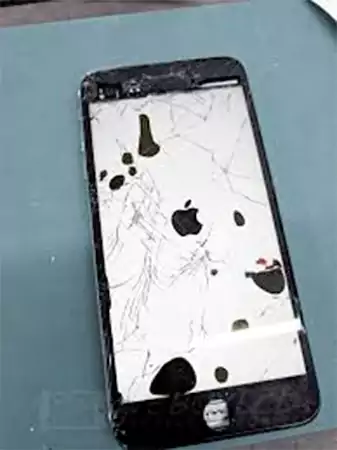
The phone has spots that are dark and can be seen under the glass. These are not dust particles or smudges; they are of the internal display panel. The black spots on mobile screen are usually a result of the inability of pixels to operate or the damage to the inner display layers. These may appear as:
- A black dot on screen
- A black patch on screen
- A little dark shadow.
These spots on the mobile screen may be of various sizes, shapes, and severity depending on the reason. The primary types are temporary and permanent spots.
- Temporary Spots: These are caused by software-related issues and can be erased after updating the software or the device.
- Permanent Spots: These are caused by hardware issues. If the spot can be seen over the background and applications, then it needs repairing.
Common Types of Screen Spots
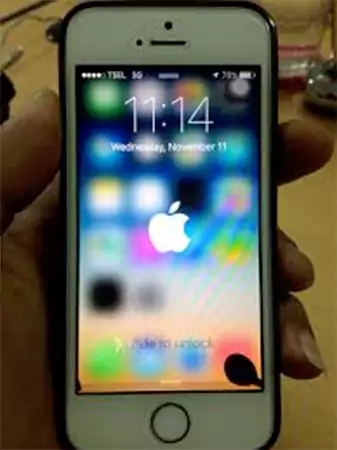
The screen spots appear different according to the kind of damage, so it is important to know the types very well.
- Small Black Dot on Screen: A damaged pixel is a black spot on the screen that is generally small. It comes as a black, round, and immobile point. Such damage can be stable, but it can increase in case of failure of the surrounding pixels. Often caused by a damaged pixel, commonly seen in devices serviced under Google Pixel repair.
- Black Spot in Corner of Phone: The majority of shocks from a fall are taken by the corners. It damages the internal display layers with cracks or compression, even though the glass may appear to be intact. Corner impacts from drops often require professional evaluation similar to what is handled in Motorola repair services.
- Black Dot Spreading on the Screen: Once a black dot appears on the screen and starts multiplying, it is likely that the LCD is bleeding or the OLED panel is damaged. Spreading spots usually indicate internal panel damage, frequently reported in OLED devices covered under OnePlus repair.
- Phone Screen Dark Spot: It is a black spot on a phone screen that can appear gray, purple, or faded instead of black. This is usually caused by the damage from pressure or burnout of pixels used in AMOLED, and can cause a distortion of brightness around the damaged region.
Why Is Part of My Phone Screen Black?
When you wonder why is part of my phone screen black, that is, it is normally a hardware problem and not a software fault.
The most widespread causes are the following:
- Pressure or Drop Damage: The falling of the phone, even a few feet down, may break internal display parts. When put under pressure (sitting on your phone or putting it tightly in a pocket), a black thing on the screen can occur.
- AMOLED or LCD Pixel Damage: The OLED displays have organic molecules, which may fail upon impact. On the LCD screens, there are liquid crystals that can leak in case of an internal crack in the panel.
Both kinds of damage may result in black spots on the phone.
- Moisture or Internal Leakage: Exposure to water has the potential to cause display circuits and the formation of black spots on the display. The smallest amount of interior moisture can lead to pixel cluster failures in due course. In severe cases, water exposure can even lead to the need for data recovery services if internal components are affected.
- Manufacturing Defect: Sometimes, the pixel cluster fails because of production defects. This is uncommon, but it exists, especially in new devices that are under warranty.
Do Black Spots on Display Spread Over Time?
Yes, they can. A tiny spot on the phone display can be fixed, but diffusion signifies gradual damage to the screen.
When black dots expand, it signals internal deterioration. In many cases, users eventually require professional screen replacement similar to repairs handled in Samsung smartphone repair services.
You can start seeing the spots grow larger or rounder and immediately know that the issue is serious. Here are some signs that the screen is failing:
- Flickering around the spot
- Reduced touch sensitivity
- Color distortion
- Inconsistency in brightness
These signs signify the failure in the display panels, and if ignored:
It can spread on the screen, causing total failure of the display. The affected part might be rendered unresponsive, and with time, a complete replacement of the screen will be needed.
Can You Fix Spots on Phone Screen at Home?
With a spot on phone screen, it is only normal to experiment with some solutions before going to the repair shop. Here are a few ways you can try out:
1. Restart and Software Checks
Persistent issues on Apple devices may require professional iPhone screen repair services if restarting does not fix the glitch.
For iPhone: Hold the side + volume button and the power button and long-press until the slider is shown on screen. Switch off, allow some seconds, and switch on.
For Android: Press the power button and then restart (or power off and switch it on again).
In case the spots do not appear over the applications, then the problem might lie in the software. When it appears everywhere, even in the lock screen and safe mode, then it has probably damaged the hardware.
Another step that can be done on a software level is a factory reset:
iPhone: Settings > General > Transfer or Reset iPhone> Erase All Content and Settings.
Android: System > Find and reset options > Erase all data (factory reset).
Please note that factory resetting deletes the data, so make sure to save all your files and photos.
2. Put a Light Pressure
In some instances, a tiny black dot appears due to the dislocation of liquid crystal (in LCD displays), which can diminish under light pressure.
To do this:
- Turn off the phone.
- Take a microfiber cloth and cover the screen with it.
- Take any soft object, such as a pencil eraser or thumb.
- Now, use gentle pressure around but not on the spot.
This would assist in redistributing liquid crystals in case the issue is minor. Note that too much pressure can damage the screen forever.
3. Why DIY Methods Usually Fail?
The black spots on the screen are primarily because of the internal damage of the panel. DIY fixes like pixel-repair apps, massaging the screen, and applying heat can hardly fix hardware breakages. As a matter of fact, the pressure or heating can make the internal cracks bigger.
And overlooking the spots can give birth to greater issues like a weak touch screen on iPhone and Android, disproportionate brightness on the display, or the whole screen eventually breaking down. DIY attempts can worsen internal damage and increase costs, similar to mishandled tablet repair cases where layered displays are involved.
Keeping the issue in check and taking it for repair early is the best way to sort out the problem.
When Professional Repair Is Required?
Although minor screen glitches can be eliminated at home, the internal hardware damage requires proper expert attention. So, here’s when you need to seek professional help:
Internal Display Damage: When the internal of the device cracks, the outer glass could still appear flawless. However, fractured or pressed LCD or OLED layers can be found underneath the surface.
Cleaning the surface of software repairs will not work in these situations. You need to go to the experts to regain the complete functionality of your device.
Pixel Cluster Failure or Screen Bleeding: Screen bleeding looks like a black patch spreading all over the screen, which increases with time. This tends to occur when the liquid crystals leak (LCD) or when the OLED pixels malfunction.
On the contrary, pixel cluster failure produces cluster black dots on the phone, which are permanent and not responsive. The two conditions are hardware issues that should be evaluated by professionals.
Correct and safe diagnosis matters because if things go wrong, it can cause connector damage or destroy the internal parts of the device.
Repair vs Replacement: What’s Better?
Whether a spot can be repaired or if the entire screen needs to be replaced? It totally depends on the type and severity of the problem. Early decisions are the best way to save time and money.
- When repair is rough: The damage can be minor and localized so that a simple repair phone screen can fix the problem. A small dot that is not spreading can be fixed by technicians easily. They will just assess the individual layers of display without having to replace the whole assembly.
- Where Full Screen Replacement is Needed: Full screen replacement is normally needed in cases when the black patch on the screen is spreading, thus affecting the visibility and malfunctioning the touch. In such cases, changing the whole display will guarantee long-lasting dependability and, at the same time, restore the quality of the screen.
- Cost-Saving Perspective: The repair of a little problem at the starting phase is cheaper than solving the full screen failure. Even though replacement might be expensive in the short term, not acting upon it can cause more harm and result in greater total costs of repair.
How Are Screen Issues Diagnosed by Experts?
Phone screen spots are serious matters that should be diagnosed precisely before making a decision on whether to repair or replace the screen. Display panels are multilayered, and therefore, pinpointing a reason behind them needs time and proper evaluation. Professional technicians like DeviceFixes use a step-by-step procedure to identify the problem.
Step 1: Visual Inspection
The first step is a close visual examination of the screen. The technicians examine the points of impact, pressure, and cracks as well as patterns on the screen. They also note the presence of sharp edges (dead pixel) or blurred edges (screen bleeding).
Step 2: Pressure and Display Testing
Technicians perform controlled pressure tests and diagnostic display tests to assess the uniformity of brightness, pixel receptivity, and color accuracy throughout the panel.
This testing identifies whether the black dot on the screen is isolated or is a part of the external or internal damage of the display assembly.
Step 3: Moisture Damage Check
Hygrometers in the machine are closely checked. The slightest exposure to water may result in corrosion or the use of pixel clusters, resulting in black spots on the screen.
It is necessary to check the internal residue or oxidation to verify whether the problem is impact-related or caused by liquid damage.
Cost Factors for Fixing Black Spots on Phone Screen
The repair costs of black spots on the phone screen will depend on various factors, such as the degree of damage. Let’s discuss these factors affecting costs here:
- Phone Model and Brand: High-end smartphones and flagship models are usually expensive due to the components of the display. Budget devices are relatively inexpensive to repair, particularly when they come with standard LCD panels.
- Screen Type (LCD vs OLED): The replacement of OLED screens is far more costly than that of LCD screens. OLEDs are more complicated and expensive to produce and are thinner.
- Size and Location of Black Spot: A minor black spot on the screen at the edge can be cheaper to deal with as compared to a huge black spot on the screen covering the core areas of viewing.
How to Prevent Black Spots on Phone Screen?
It is more cost-effective to prevent the occurrence of spots on the phone screen than to fix internal display damage. Here are a few ways to prevent them:
1. Avoid Pressure and Drops
One of the most popular causes of the black spot on the corner of the phone and its spread is falling. Keep it in a shock-absorbing case and do not place your phone in back pockets or narrow areas where it can be bent or compressed.
Internal pixels can be easily broken by even minimal pressure that is not sufficient to break the outer glass.
2. Use Screen Protection
Using a good tempered glass protector that is of high quality helps to absorb impact and evenly distribute the force around the screen. Although it is unable to totally avoid internal damage, it minimizes the risk of cracks and pressure-related black dots on the phone.
3. Keep Device Dry
The presence of moisture may result in internal corrosion and cause black spots on the display in the long run. Do not keep your phone in water, humidity, or damp places.
When your device becomes wet, make sure to dry it as soon as possible and do not charge the device without proper examination.
Conclusion
Dots on the cell phone display are not simple damage but often mark internal damage on the display below the surface. Be it the dot size or the growing one, neglecting it may end up costing more than it can help.
It is better to act early to avoid paying more to repair the device and to save the functionality of your device. Although simple software analysis is harmlessly testable, professional diagnosis is much more effective than home solutions when it comes to black spots on the screen.
FAQs
Q: What causes a black dot on screen?
Q: Can a black patch on screen disappear?
Ans: Restarting might correct the problem, especially in the case of a software-related issue. In the case of internal damage, the spots don’t go away.
Q: Is a small black dot dangerous?
Ans: The appearance of a small black dot on the screen is not dangerous; however, this will be an indicator of initial pixel failure.
Q: Should I replace the screen immediately?
Ans: The stable tiny spots need monitoring, or else the spots can gradually grow and cause display issues. So, at the start, you do not have to replace the whole screen directly.
Sources:
Black spot on iPhone 11 screen by Apple Discussion