Ans: Android 16 is the latest Android version known as “Backlava,” and can be seen in the latest flagship phones released by Samsung, Google, Oppo, etc.
Android Latest Version: Current Android OS & Complete Version History

Updated On April 3, 2026
Android 16 is Android latest version, which continues to enhance the security, intelligence, and performance of devices. In addition, keeping your phone current will help you operate more smoothly and still allow the functionality of your phone to support new applications. If your device starts slowing down after updates, professional smartphone repair services can help restore performance.
This guide will help you learn about the latest versions of your device, as well as important features of the latest operating system, as well as a comprehensive record of all previous versions of the Android operating system. So that you will be able to understand how your device has progressed through time, especially if you are using devices like Samsung phones or Google Pixel devices.
Table of Contents:
- What Is the Android Latest Version?
- Latest Android Version Features
- Android Operating System Version History
- Android Version Names Explained
- What Android Version Do I Have?
- How to Update to Android Latest Version?
- Why Some Phones Don’t Get the Latest Android Version
- Android vs iOS Updates (Quick Comparison)
- Common Problems After an Android Update
- Tips to Keep Your Android System Updated
- Conclusion: Why Staying on the Latest Android Version Matters
- FAQs
What Is the Android Latest Version?
Android 16 is the most recent android version (2025). A variety of flagship phones with Android 16 are being launched. However, Android 15 is still the most widely used version and is currently being rolled out across devices such as OnePlus smartphones and Motorola phones.
- Latest Android OS version name and number: The most recent android version is Android 16, Android 15 is by far still the most common and the most stable version being used worldwide.
- Release Date: While Android 16 was released on June 10, 2025, it was only officially available for flagship smartphones as of its release date, and it will continue to roll out to the rest of the supported Android devices over a prolonged period of time.
- Key Improvements Over Previous Versions: Some of the biggest improvements in Android 16 include increased AI functionality and reliability, increased battery life, and enhanced security and privacy. Android 16 also provides superior system efficiency compared to Android 15.
Users should know that Android 17 has also been launched for beta testing but since it’s still in beta and isn’t available on any device it would not be considered android latest version.
Android Latest Version Features
In Android latest version, significant design modifications have taken second place to more practical improvements. The updated application functionality and features have increased usage, enhanced security, and enhanced the total experience.
- AI enhancements and intelligent features have been integrated into Android: The operating system uses AI to manage battery consumption, recommends certain actions, and smartly recycles system notifications while customizing the entire application’s behavior based on your usage.
- Privacy and security: Consumers have both been positively impacted by new permission settings, enhanced clarity regarding data collection practices, and tighter restrictions on background processes can be seen in the most recent Android version.
- Performance Improvements: These can be viewed together through performance enhancements such as quicker launch times, smoother animations, and increased memory management on the device, all of which contribute to improved responsiveness and efficiency for the end user.
- UI Change: The size and structure of UI modifications have been related to updates made to the previous user interface. However, there have also been design refinements, improved options for customizing the UI, and ultimately improved navigation throughout all apps and content, thereby increasing the level of service provided to all users by both Android devices and applications. Users switching between mobile and larger devices like tablets or iPads will notice more consistency in UI improvements.
Android Operating System Version History
Android has released multiple versions over the years. Users with older devices or systems such as laptops or Mac systems often compare update cycles across platforms. With that being said lets take a look at android operating system version history:
| Android Version | Codename | Release Year |
| Android 16 | Baklava | June 10, 2025 |
| Android 15 | Vanilla Ice Cream | September 3, 2024 |
| Android 14 | Upside Down Cake | February 8, 2023 |
| Android 13 | Tiramisu | August 15, 2022 |
| Android 12 | Snow Cone | February 18, 2021 |
| Android 11 | Red Velvet Cake | June 10, 2020 |
| Android 10 | Quince Tart | September 3, 2019 |
Android Version Names Explained
The latest version of Android is based on desserts in alphabetical order, for each version. This made it easy for consumers to remember and identify Android versions as well as have a unique identity from each other. If you’re comparing ecosystems, performance differences are often discussed in comparisons like iPhone vs Samsung.
Google switched to a numeric-only branding system with Android 10 so that users could identify different Android versions more easily, regardless of where they live in the world. This transition was a well-publicized change and is familiar to the public.
But dessert names are still being used internally by developers for the same reasons (to identify Android versions more easily). For example, the internal code name of Android 15 will be “Vanilla Ice Cream,” so that dessert names can still be used internally while using a consistent numeric-only naming convention for consumers.
ALSO READ: iPhone Touch Screen Not Working? Step-by-Step Troubleshooting Guide
What Android Version Do I Have?
Want to check what Android version your device has? Here’s what you need to do:
Check Android Version on Your Phone
- Open Settings.

- Go to About Phone.
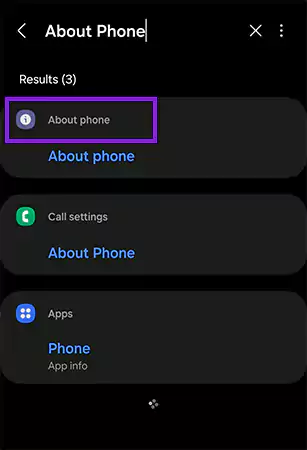
- Tap on “Software Information.”
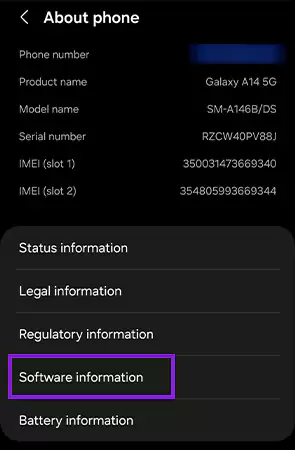
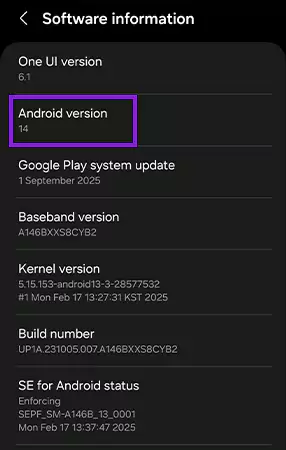
- Tap on Android Version.
How to Update to Android Latest Version?
Thinking about upgrading to the latest Android version? Here’s what you need to do:
Update Through System Settings
- Go to Settings.
- Search Software Update.
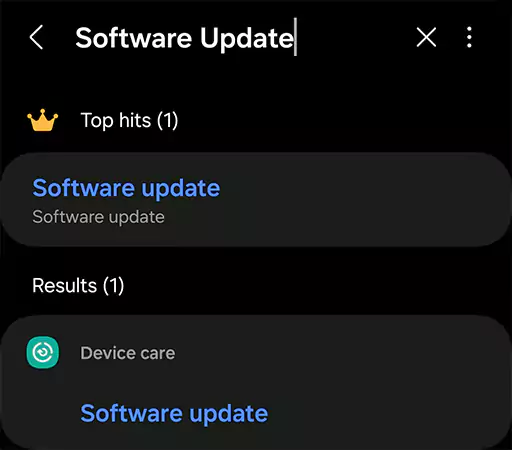
- Open it and install if a new version is available.
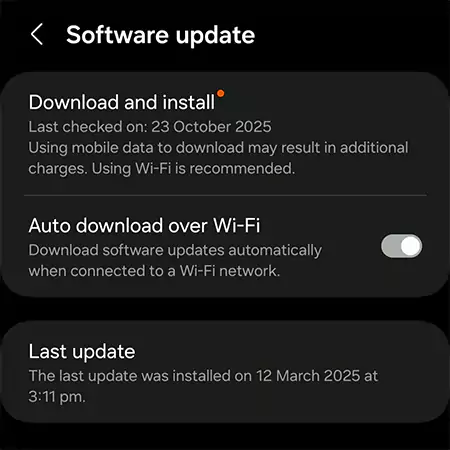
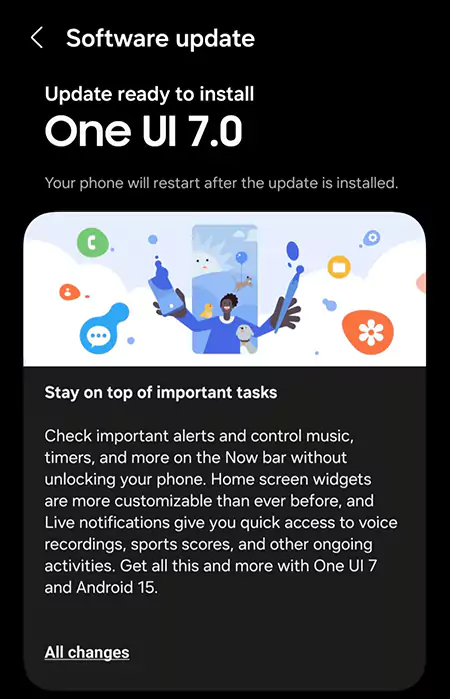
When Updates Are Not Available
Some updates may be delayed in android latest version due to manufacturer or carrier limitations. If your device faces issues during updates, services like data recovery or system diagnostics can help.
Limitations of the manufacturer:
Older devices will comply with an original plan to cease supporting updates when they have reached the end of their originally scheduled support time.
Carrier delays:
Due to testing and validation, network service providers can take longer to provide updates than the manufacturer intended.
Why Some Phones Don’t Get the Latest Android Version
The latest Android version is not available on all devices due to hardware and manufacturer limitations. Older systems, including computers, also face similar upgrade restrictions over time.
Most manufacturers will only provide updates for a certain amount of time and have different versions that aren’t compatible with the newest features on some older models. In addition to that, specific models may be delayed by the carrier from receiving the newest updates on Android.
Android vs iOS Updates (Quick Comparison)
Let’s compare Android vs iOS (iPhone vs Samsung) updates and see which one is better in the table given below.
| Feature | Android | iOS |
| Update Availability | Depends on the manufacturer | Simultaneous rollout |
| Device Lifespan | 2-4 years typically | 5+ years |
| Customization | Highly customizable | Limited |
Common Problems After an Android Update
After upgrading to a new Android release, it is possible to have temporary problems following the installation. This is often caused by a battery drain while the system re-optimizes all the applications that are running in the background and other processes.
There could also be a lack of compatibility with applications at first, before they are updated for the latest version of the operating system. Older devices will also usually experience a performance lag due to the increased system resource requirements for the new operating system.
Although these problems are temporary in most instances, they should improve as the device’s operating system stabilizes and there are updates for the incompatible applications.
Tips to Keep Your Android System Updated
Updating your device can improve long-lasting performance and safety features. Here are some other useful tips:
- Automatic updates should be enabled. Automatic updates provide for automatic installation of updates without requiring any manual intervention from you.
- You should keep some amount of free space available. There will be issues with the installation of updates if there isn’t enough available storage to complete the installation.
- Regular installation of patch updates will help to provide an additional level of security for your device between major updates.
ALSO READ: How Much Does It Cost to Repair a Phone Screen? Average Repair & Replacement Costs
Conclusion
Android 16 is the android latest version and keeping your device updated ensures better performance, improved security, and compatibility with modern apps. If your device cannot support the latest Android version, maintaining it properly or repairing hardware issues can extend its lifespan, similar to maintaining devices like game consoles or systems such as PlayStation and Xbox.
If you do not have access to a newer version of Android like “Android 16” at this time, keeping up with the latest version that your phone supports will still allow for more stability, more security, and a longer usable lifespan for your phone.
FAQs
Q: What is the current Android version?
Q: What’s the latest Android version available today?
Ans: Android 16 is the latest Android version available in the market. However, Android 17 has also been teased in Feb of 2026 and is now available for beta testing.
Q: How do I check my Android version?
Ans: Simply open your phone settings and search “About Phone.” Open “About Phone”, you’ll find an option “Software Information,” and there you can see the Android version.
Q: Can older phones get the newest Android update?
Ans: Older phones usually cannot get the newest Android updates because manufacturers stop support after a few years of software updates and security patches.
Q: How often does Android release updates?
Ans: Android typically releases a major update once every year, along with smaller monthly security updates and occasional feature updates for supported devices.
Source:
Android Releases by Android Developers