POS system testing checks whether hardware and software work properly together and finds transaction errors, connectivity issues, compatibility problems, and security risks.
POS System Testing: Hardware Checks, Troubleshooting, and Software Compatibility

Updated On November 17, 2026
Point of Sale (POS) systems are important for everyday transactions in retail stores, restaurants, and shopping malls. These systems depend on hardware components such as touchscreen terminals, barcode scanners, receipt printers, and payment readers working together with POS software. Even a small hardware malfunction or connectivity issue can interrupt transactions and affect business operations.
POS testing helps identify issues with hardware functionality, software compatibility, and communication between connected devices. A barcode scanner may fail to read product codes, a receipt printer may stop reacting, or a payment terminal may lose connectivity. Testing these components under real operating conditions helps prevent failures and keeps checkout operations running efficiently.
Table of Contents:
What Makes POS Hardware and Software Testing Different
The distinctive quality of POS (Point of Sale) testing is due to its demand for testing in real-world scenarios alongside hardware systems integration. Here’s what makes it different:
- Simulating a Retail Environment: Testing software functions should extend beyond basic checks, since testers have to create real-world retail scenarios to verify system performance in operational retail environments.
- Requires Domain Knowledge: Testers need specific knowledge about retail processes as well as transaction methods and device communication to ensure operational smoothness.
- Hardware and Software Integration: POS testing involves checking how applications integrate with connected hardware, including barcode scanners, receipt printers, payment terminals, and touchscreen displays. It also helps identify device connection failures, driver compatibility problems, and incorrect hardware responses.
- Two-Level Testing: The testing process consists of two levels that include storefront testing alongside enterprise-level testing for information synchronization and secure backend procedures.
- Dedicated Testing Labs: POS systems require testing in facilities designed specifically for this purpose with hardware configurations that duplicate real market settings.
POS testing can be more complex than standard application testing because it needs coordination between physical devices, software applications, and real-world retail workflows.
Benefits of POS Testing
POS testing is an important part of retail system maintenance because it helps ensure accurate transactions, reliable hardware performance, and smooth business operations. Here’s how it helps:
- Accurate Pricing & Discounts: It makes sure that correct pricing, together with tax computation and discounts, is applied so that consumers will not have disputes.
- Data Security: It protects sensitive payments and customer data from breaches and fraud.
- Real-Time Inventory Management: It provides accurate stock tracking, which stops both overstocking and inventory shortages from occurring.
- Smooth Checkout Experience: It ensures quick transaction processing and prevents technical problems.
- Reliable System Performance: The system maintains efficient performance by reducing operational disruptions.
- Compliance with Industry Standards: Ensures adherence to security regulations like PCI DSS.
- Multiple Payment Compatibility: It verifies its ability to accept payments through various methods, including credit cards and mobile payments.
- User-Friendly Interface: Ensures the staff can work with the interface without difficulty, which enables them to offer better customer service.
Testing POS systems comprehensively enables businesses to enhance their system reliability, together with security features, and improve the customer experience.
How to Test and Troubleshoot POS Hardware Components
A Point of Sale (POS) system contains different hardware components, which together ensure smooth transaction processing. Testing the hardware components maintains operational efficiency and avoids expensive hardware breakdowns.
- Terminal: All transaction information appears on the terminal through its main touchscreen interface, including amounts and discounts, together with inventory updates. The testing team verifies OS compatibility for the terminal while checking price accuracy and information display. If the touchscreen stops responding, check the power supply, restart the terminal, and check the display for physical damage.
- Display Pole: It functions as a compact device that displays item prices to customers. The testers verify that the display pole shows the exact prices as the terminal system with no price variations. If prices are not displayed correctly, check the cable connection and ensure that the display is synchronized with the POS terminal.
- Receipt Printer: It produces printed documents, which display product information, pricing details, and tax breakdowns. Testers verify printed information accuracy, check print quality and paper availability, and examine printer behavior during power interruptions. Common verifications include clearing paper jams, verifying printer connectivity, and checking paper installation. If the receipt printer is connected but stops responding, considering its connection settings and print queue can help identify the issue. For additional troubleshooting steps, refer to this printer offline troubleshooting guide.
- Barcode Scanner: It serves as an inventory data retrieval device through product barcode scanning. Testers check that the barcode scanner executes its functions properly by updating stock counts and managing both valid and invalid barcode readings. If scanning fails, check the USB or Bluetooth connections, clean the scanner window, and test a known readable barcode.
- Handheld Payment Devices: Customers use handheld payment devices for card transactions. The testing procedure includes verification of card authentication while ensuring proper PIN entry and testing conditions like incorrect PINs and failed transactions. If transactions fail, check network connectivity and check whether the device is communicating with the payment system.
- Cash Register: When customers choose cash payment, the Cash Register system activates automatically. Testers evaluate the device’s performance by checking its proper opening time, correct amount recording, and precise balance updating for the store. If the drawer fails to open, inspect the cable connection, drawer mechanism, and POS configuration.
- Magnetic Swipe Reader (MSR): It reads debit, credit, and gift cards. The testing process verifies proper transaction processing, card expiration verification, and correct gift card identification. If card reading fails, verify the reader connection and test with an authorized test card.
The complete testing of these components leads to dependable and smooth Point-of-Sale interactions between businesses and their users.
Testing Android-Based POS Applications on Linux
Some POS terminals run Android-based applications, and software issues can sometimes appear similar to hardware failures. For example, an unresponsive checkout screen may be caused by an application error instead of a faulty touchscreen.
For Android-based POS systems, developers can use an Android emulator on Linux to investigate app crashes, test checkout screen responsiveness, and check software compatibility across different Android versions. This helps identify application-level issues before testing the software on physical POS terminals. Since Android versions can affect application compatibility and performance, developers should also check which OS versions their POS applications support. For better insights on Android updates and version compatibility, refer to this guide on the latest Android version.
However, an emulator cannot fully reproduce hardware-specific interactions, such as physical barcode scanning, receipt printing, or card reader communication. These functions have to be tested on actual POS devices.
Types of POS Testing To Focus On
A POS system requires thorough testing of its hardware and software components to support smooth, secure, and dependable transactions. The following list contains the main types of testing that should be considered:
Testing Physical Components
- Functional Testing: It includes the evaluation of hardware components, like POS terminals, barcode scanners, and card readers, to verify their correct operational functionality. The testing process includes checking basic transaction operations as well as barcode reading precision and inventory system connections.
- Compatibility Testing: The POS terminal goes through compatibility testing to verify its operational connection with scanners, printers, and payment processors.
- Usability Testing: This method provides the efficiency of employee terminal and scanner system interactions to deliver a seamless user experience.
Testing Software Components
- Functional Testing: It checks the main processes, like sales processing alongside refunds and exchanges. It checks if the inventory management system and its automated reordering features and alerts for stock levels work properly.
- Integration Testing: It verifies its seamless connection with business software, including CRM, accounting, and inventory management applications.
- Performance Testing: It verifies how the system handles elevated transaction loads that occur during peak shopping times and the response times for stock updates and customer data retrieval actions.
- Security Testing: Tests for data privacy and compliance with regulations. The assessment of vulnerabilities aims to safeguard important payment and customer data.
- Network Testing: It determines the speed and reliability of POS system-server communication to stop transaction delays.
- Regression Testing: It helps verify that software updates do not disrupt existing features or impact system stability.
POS testing that is done thoroughly enables organizations to prevent problems while enhancing system performance and delivering a reliable experience to users.
Conclusion
POS system testing requires checking both hardware functionality and software reliability. From touchscreen terminals and barcode scanners to receipt printers and payment devices, every component must work accurately to support smooth transactions.
Regular hardware diagnostics, software compatibility testing, and practical troubleshooting help businesses identify failures early, reduce downtime, and maintain dependable checkout operations.
Frequently Asked Questions
What is POS system Testing?
Which POS hardware components should be tested regularly?
Important components include touchscreen terminals, display poles, receipt printers, barcode scanners, and magnetic stripe readers.
How to troubleshoot a POS system that is not responding?
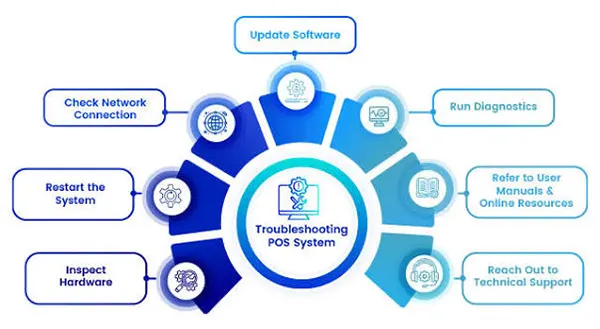
Start by checking the power supplies and device connections, then restart the terminal, inspect connected hardware, check software settings, and identify any error messages.