
Most of the world uses the paper size A4 (210mm x 297mm), while in America and Canada, most printing uses Letter size (8.5″ x 11″).
Printer Paper Size: A Complete Guide to Dimensions, Standards & Uses
Selection of the proper printer paper size is necessary for clear and professional printing of documents. No matter whether you are printing letters, reports, homework, brochures, or posters, the selection of proper paper size depends on the document, printer, and commonly used standards in your country.
Prior to printing, it is required to make sure that your printer can handle this paper size, and the paper size selected in the printer menu corresponds to the size of paper you have put in the tray. If you have problems with printer lines or streaks, read our guide on how to fix printer streaks.
This article provides information about commonly used printer paper sizes, standards in different countries, paper sizes and their uses, and proper paper size selection.
Quick Answer:
In most countries, A4 (210 × 297 mm) is the default printer paper size. US Letter (8.5 × 11 in, about 216 × 279 mm) is the standard in the US and Canada. Larger and smaller sizes, such as A3 and A5, depend on the document requirements and your printer’s supported paper sizes.
Table of Contents:
- What Is Printer Paper Size?
- What Is Standard Printer Paper Size?
- A-Series Paper Sizes and Dimensions
- Other International Paper Sizes: B-Series and C-Series
- North American Paper Sizes
- Common Printer Paper Sizes and Their Uses
- How Standard Paper Sizes Are Determined
- A3 vs. A4 vs. A5: What Is the Difference?
- How to Choose the Right Paper Size
- How to Set the Correct Paper Size Before Printing
- What Sizes of Paper Does the Printer Support?
- Tips for Reducing Paper Waste
- Conclusion
- Frequently Asked Questions
What Is Printer Paper Size?
Printer paper size is the actual physical length and width of the paper used by the printer. The printer paper dimensions are normally indicated in either millimeters (mm), centimeters (cm), or inches. The size of printer paper determines the amount of information that can be printed and also determines whether printing is done without undesired cropping or resizing of the documents.
There are two popular formats one is the ISO 216 A series used in most countries and Letter or Legal in North America. Different printers may provide various sizes depending on their capabilities and print settings.
What Is Standard Printer Paper Size?
There isn’t a universal printer paper size for printing purposes. The most commonly used document size is A4, but there is another document size called US Letter that is frequently used in the United States and Canada.
| Paper size | Dimensions (mm) | Dimensions (inches) | Common uses |
| A4 | 210 × 297 | 8.27 × 11.69 | Letters, reports, school and office documents |
| US Letter | 216 × 279 | 8.5 × 11 | Everyday documents and business correspondence |
| Legal | 216 × 356 | 8.5 × 14 | Contracts and documents needing extra length |
In case you were wondering about “What size is printer paper,” you will have to figure out if the place you are at follows the A4 paper or the Letter paper convention, which are both almost the same, although not quite.
A-Series Paper Sizes and Dimensions
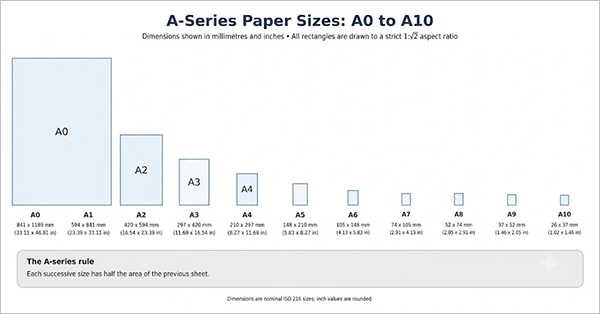
The sizes in the ISO 216 A-series standard are related in such a way that each size in the series has approximately half the area of the previous size when cut parallel to the shorter edge, and are rounded to whole millimeters. A4 is the most common size format in regular use. Larger sizes (e.g., A3) are used when a document needs more space to be printed.
| Size | Dimensions (mm) | Dimensions (inches, approx.) | Typical uses |
| A0 | 841 × 1189 | 33.11 × 46.81 | Large technical drawings and posters |
| A1 | 594 × 841 | 23.39 × 33.11 | Charts, plans, large presentations |
| A2 | 420 × 594 | 16.54 × 23.39 | Posters and calendars |
| A3 | 297 × 420 | 11.69 × 16.54 | Diagrams, brochures, larger spreadsheets |
| A4 | 210 × 297 | 8.27 × 11.69 | Letters, reports, general printing |
| A5 | 148 × 210 | 5.83 × 8.27 | Notebooks, flyers, booklets |
| A6 | 105 × 148 | 4.13 × 5.83 | Postcards and invitations |
| A7 | 74 × 105 | 2.91 × 4.13 | Small cards and inserts |
| A8 | 52 × 74 | 2.05 × 2.91 | Small labels and compact printed pieces |
| A9 | 37 × 52 | 1.46 × 2.05 | Very small labels and cards |
| A10 | 26 × 37 | 1.02 × 1.46 | Tiny printed pieces; printer support varies |
Not all printers in homes and offices can support smaller sizes of A-series sheets. Always check the smallest paper size your printer supports in its specifications.
Other International Paper Sizes: B-Series and C-Series
The paper size system under ISO 216, apart from the A series, also consists of the B series. C series are generally employed for envelopes that will contain A series sheets. It is important to know about both for choosing paper for printing and packaging.
ISO B-Series Paper Sizes and Dimensions
B-series paper sizes offer a range of dimensions that exist between two successive A-series paper sizes, maintaining the same proportion of 1: √2. The B-series is used when the A-series is not ideal for printing certain documents.
| Paper size | Dimensions in millimeters | Dimensions in inches (approx.) |
| B0 | 1000 × 1414 mm | 39.4 × 55.7 in |
| B1 | 707 × 1000 mm | 27.8 × 39.4 in |
| B2 | 500 × 707 mm | 19.7 × 27.8 in |
| B3 | 353 × 500 mm | 13.9 × 19.7 in |
| B4 | 250 × 353 mm | 9.8 × 13.9 in |
| B5 | 176 × 250 mm | 6.9 × 9.8 in |
This is the B series size according to ISO standards. JIS B series paper sizes will be different in Japan; hence, make sure you verify the actual size of the paper in your printer options or on the paper pack. B-series paper sizes cannot be used by all printers available in the market.
C-Series Paper Sizes and Dimensions
The sizes of C-series formats are mainly used in making envelopes and not printer paper. The sizes of these formats can contain the corresponding sizes of A-series format sheets, which could be either folded or unfolded.
| Envelope size | Dimensions in millimeters | Typical use |
| C4 | 229 × 324 mm | Holds an unfolded A4 sheet |
| C5 | 162 × 229 mm | Holds an A4 sheet folded in half |
| C6 | 114 × 162 mm | Holds an A4 sheet folded into quarters |
For instance, a C4 envelope can accommodate an A4 sheet without having to fold it, while a C5 envelope will be appropriate when an A4 sheet has been folded in half. This particular size is helpful in letter preparation.
Important: B Series papers and C Series envelopes cannot be interchanged. If you wish to print directly on an envelope, make sure that your printer accommodates its size and type.
North American Paper Sizes
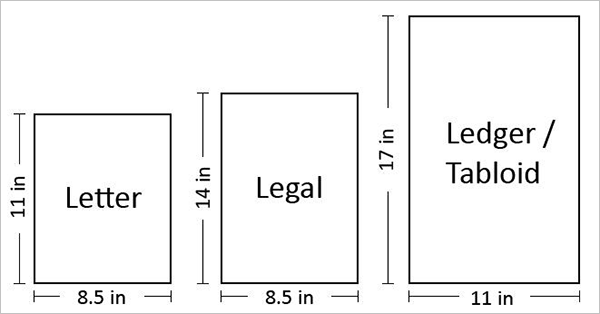
North American paper sizes use names such as Letter, Legal, Tabloid, Ledger, and Executive. Their dimensions do not follow the same halving sequence as the ISO A-series.
| Paper size | Dimensions (inches) | Dimensions (mm, approx.) | Typical uses |
| Letter | 8.5 × 11 | 216 × 279 | Everyday office and personal documents |
| Legal | 8.5 × 14 | 216 × 356 | Contracts and longer documents |
| Tabloid | 11 × 17 | 279 × 432 | Newsletters, diagrams, larger layouts |
| Ledger | 17 × 11 | 432 × 279 | Spreadsheets and wide-format documents |
| Executive | 7.25 × 10.5 | 184 × 267 | Some business correspondence and stationery |
Tabloid and Ledger use the same sheet dimensions in different orientations: Tabloid is typically 11 × 17 inches, while Ledger is 17 × 11 inches.
Common Printer Paper Sizes and Their Uses
There are a variety of printing paper sizes used in, and each has a distinct purpose. Let’s look at the types of paper and what each is best used for.
A4 and Letter for Everyday Printing
A4 and Letter are the most common printer paper sizes used for normal printing; however, the correct choice will vary depending on the document and local standard. Try to use the same size that the document was created to maintain its formatting and layout.
Legal Paper for Longer Documents
Legal paper is longer than Letter paper and is chosen when more vertical space is needed on the document. Choose Legal in both the document or print setup and the printer tray setup.
A3 and Tabloid for Larger Layouts
Both A3 and Tabloid paper sizes can be used when dealing with large spreadsheets, diagrams, posters, flyers, and presentation papers. Since their sizes are different, you need to know the printer size before printing.
A5 and A6 for Smaller Printed Items
The size A5 is well-suited for booklets, small notebooks, and flyers. A6 is typically used for postcards and invitations. Note printer capability and paper feed mechanism when opting for smaller sizes.
How Standard Paper Sizes Are Determined
The A Series format in ISO 216 has a ratio of 1:√2 between the two sides. This indicates that cutting the sheet along the shorter edge in half will yield another piece with the same ratio. It facilitates the scaling of documents among the different A Series sizes.
This is not the case in North American formats such as Letter and Legal, which were created under a different convention. This is why Letter and A4 are similar in size but not equal.
A3 vs. A4 vs. A5: What Is the Difference?
| Paper size | Dimensions (mm) | How it compares | Common uses |
| A3 | 297 × 420 | Larger than A4 | Posters, diagrams, large spreadsheets |
| A4 | 210 × 297 | Half the area of A3; larger than A5 | Letters, reports, office documents |
| A5 | 148 × 210 | Half the area of A4, approximately | Booklets, flyers, notebooks |
A3 is bigger than A4, which is in turn bigger than A5. Within the A series, the next sheet size is always half the size of the previous one. It is important to note that not all printers will be able to print in these three sizes.
A4 vs. US Letter
A4 size paper has dimensions of 210 x 297 mm (8.27 x 11.69 inches), whereas US Letter paper has dimensions of 216 x 279 mm (8.5 x 11 inches). A4 paper is smaller in width but larger in height. If you attempt to print one on another, there could be movement of the text and scaling issues.
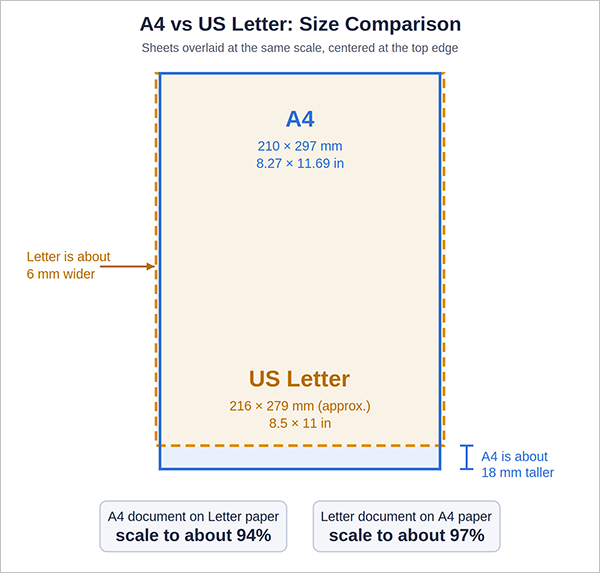
As a rule of thumb, an A4 document printed on Letter paper needs to be reduced to about 94% so the longer A4 page fits within the shorter Letter page. A Letter document printed on A4 needs about 97% so it fits the narrower A4 width. “Fit to page” or “Shrink to fit” applies a similar reduction automatically, but check print preview to make sure margins and page breaks still look right.
How to Choose the Right Paper Size
The choice of the paper size should be determined by its layout, usage, local tradition, and printer capability. Choosing the appropriate size will prevent such problems as text cutting and paper waste.
Paper Sizes for Office and Business Use
For normal office papers where A4 is the common standard, use A4; otherwise, for the US and Canada, use Letter size paper. Legal paper may be suitable for longer documents, but for charting, diagrams, and spreadsheets, one may use A3 or Tabloid size paper.
Paper Sizes for Books and Magazines
Choosing the correct sheet size would depend on the type of final product as well as how it is being printed. A5 sizes are commonly used for small books or booklets. A4 sizes may be used for workbooks or catalogs. It is possible to use large sizes in commercial book printing since trimming would take place after the printing process.
Paper Size Is Different from Paper Type and Weight
Size relates to the physical measurements of the page. Type and weight relate to other characteristics of the paper, including its type, which can be plain, glossy, or cardstock, as well as its weight. The printer may allow a specific size but not specific types or weights.
For general printing requirements in the United States, the ideal paper size for documents, letters, school homework, and reports is US letter (8.5 × 11 inches). The legal size should be preferred for longer documents (8.5 × 14 inches), while tabloid (11 × 17 inches) or A3 (11.69 × 16.54 inches) paper should be selected for larger graphs and diagrams, assuming that the printer accepts that size.
The A4 paper (8.27 × 11.69 inches) is popular worldwide but not the default US office paper size.
How to Set the Correct Paper Size Before Printing
To set your document, printer, and paper settings to match for accurate printing, follow these steps.
Select the Paper Size in the Print Dialog
Navigate the Print menu of the application and choose a paper size that fits the document and the paper you plan to use. The name of the menu may differ depending on the operating system and application.
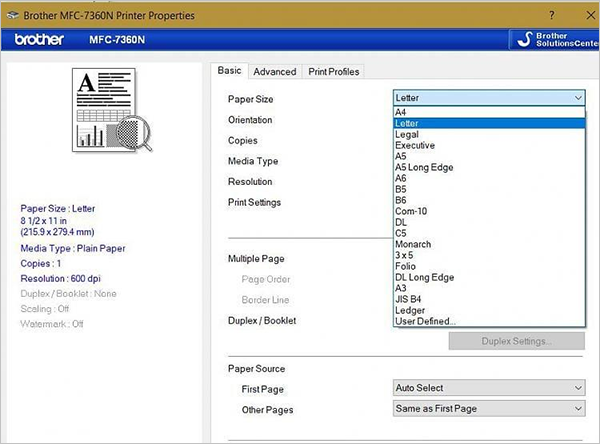
Typical routes:
- Windows: choose File > Print, open Printer Properties (or Preferences), and look for the paper size on a Paper or Quality tab. The tab name depends on the driver.
- macOS: choose File > Print and use the Paper Size menu. If the options are hidden, click Show Details.
- Also check the document’s own page size, for example, Layout > Size in Word, so the document and the printer agree.
Match the Paper to the Tray
Refer to the size that is mentioned on the paper packet and make sure that the guides inside the tray suit the sheets you have loaded. When there is a mismatch between the print driver and the paper tray setting, the printer gives an error message about paper size. A paper-size or tray mismatch can also create feed issues, so if a sheet becomes jammed, check how to fix a printer paper jam.
Fix Documents That Are Cut Off or Scaled Incorrectly
Use the print preview function to view the page before printing it. Check for the page size, margins, orientation, and scaling settings. The option of “fit to page” or similar could be useful, although it might reduce the content but won’t fix all problems.
What Sizes of Paper Does the Printer Support?
While most desktop printers offer A4 or Letter printing capability, availability of Legal, A3, A5, A6, envelopes, and custom-sized papers varies according to different models of printers. It is important to note that there is no guarantee that all types of paper sizes mentioned here are printed by all printers.
How to know which sizes are supported by your printer:
- You can read the specifications provided by the manufacturer of the printer.
- See the paper-size list in the settings or print dialog box.
- Know the size limitations per tray or manually inserted sheets.
- Find out whether there is a limitation on paper thickness, envelopes, or custom sizes.
In case the paper size of choice is not listed, you should check if the printer is properly installed and has the capacity to print that size paper.
Tips for Reducing Paper Waste
- Check the print preview before printing out the document.
- Select the right page size and orientation for your document.
- Print on both sides of the paper whenever possible.
- Print only those pages that are required, not the entire document.
- Print a test page first before doing any long print job.
- Print several pages on one sheet of paper for rough prints and handouts.
- Adjust margins and scaling rather than printing multiple test pages.
- Go for electronic transfer rather than printing a hard copy when not needed.
- Go for print preview while printing emails and websites.
- Re-use single-sided prints for rough prints and recycle the remaining.
Maintenance can help reduce misfeeds and wasted paper. See our printer maintenance tips for easy habits that will keep your printer running well.
Conclusion
To be able to print professionally and efficiently, it is very important to know about printer paper sizes and standards (dimensions). All printing needs, like business documents, presentations, legal documents, and marketing documents, will improve in compatibility (working together) because of the correct paper size being used for anything printed on. In addition, the printing will have better print quality when the paper size is the correct one to use.
Knowing about International paper standards and common paper sizes should make determining the right size of paper for printing documents a lot easier.
If your printer continues to have issues after checking the paper size and type, it may be having issues due to problems with the printer itself. You can visit our printer repair service to find out how we can help you.
Frequently Asked Questions
What paper size is standard for printers?
What is the difference between A4 and Letter size?
When comparing A4 and Letter paper, A4 is slightly narrower and longer than letter paper, which means the A4 paper is 210mm x 297mm versus the 216mm x 279mm for letter paper.
What paper size should I use to print a document?
A4 and letter-size papers are both suitable for printing office documents and for everyday printing.
What type of paper size should I use for legal paper?
Legal papers should be printed on legal-size paper (8.5″ x 14″).
What is the size of A1, A2, A3, and A4?
A1 is 594 mm × 841 mm (23.39 in × 33.11 in), A2 is 420 mm × 594 mm (16.54 in × 23.39 in), A3 is 297 mm × 420 mm (11.69 in × 16.54 in), and A4 is 210 mm × 297 mm (8.27 in × 11.69 in). Each size in the series has approximately half the area of the previous one.
Is printer paper A4 or A5?
The paper size of the typical office printer is A4 (210 × 297 mm) or US Letter in North America. A5 (148 x 210 mm) is half the size of A4 and is used for flyers, notepads, and small booklets. A5 paper may not feed through your printer automatically and may require a special tray or a manual feed. Consult your owner’s manual for information on paper feed.
What is A4 size paper?
A4 is an ISO standard paper size that is 210 mm by 297 mm (8.27 by 11.69 in.) Most letters, reports, and other official documents used in different countries are printed on this size paper. It is longer and narrower than the US Letter Size, which is 8.5 in. by 11 in.
What are the dimensions of printer paper?
The most common printer paper dimensions are A4 at 210 × 297 mm (8.27 × 11.69 in) and US Letter at about 216 × 279 mm (8.5 × 11 in). Legal is 8.5 × 14 in, and A3 is 297 × 420 mm.
What size is a regular printer page?
In most countries other than the US and Canada, the default page size is A4. The default in the US and Canada is Letter. Check your printer’s paper tray or specs to be sure.