
Ans: There can be several causes like bluetooth glitch, low battery, or dirty contacts, which can prevent your AirPods from not connecting.
One AirPod Not Working: Complete Troubleshooting Guide
If one AirPod is not working, there is usually a problem with the batteries, a faulty connection or a dirty speaker. In many cases, a quick fix will involve a simple reset, cleaning or reconnection.
This guide explains why one AirPod is not working, and how to fix it as quickly as possible.
Table of Contents:
- Common Signs of AirPod Problems
- Why is Only One AirPod Working?
- Left AirPod Not Working
- Right AirPod Not Working
- AirPods Won’t Connect at All
- How to Reset AirPods to Fix One Side Not Working?
- Cleaning AirPods to Fix Sound Issues
- When One AirPod Needs Replacement?
- Repair vs Replacement: What’s the Better Option?
- How to Prevent AirPod Connection Problems?
- Fix One AirPod Not Working the Right Way
- FAQs
Common Signs of AirPod Problems
Obvious symptoms indicate that there is a problem with your AirPods, but the root cause of these symptoms can vary widely.
Common signs that flag the AirPod problem are mentioned below:
- If you hear sound coming from only one AirPod, it could mean that the battery is unbalanced, there’s a problem with the connection, or there is something blocking the speaker mesh.
- Your AirPods may not be able to connect to your device for different reasons. A Bluetooth glitch, out-of-date firmware and/or issues with the pairing process.
- If you lose the connection to one of your AirPods while using them, this could be due to interference, the charge getting low, and/or a syncing issue between the two pods.
Why is Only One AirPod Working?
Wanna know why only one AirPod is not working? Take a look at this table:
| Cause | Explanation |
| Battery Imbalance | One AirPod drains faster |
| Bluetooth Connection Error | Pairing Glitch |
| Dirt in Speaker Mesh | Blocks sound output |
| Firmware Bug | Software Issue |
| Hardware Damage | Internal component failure |
Left AirPod Not Working
Sometimes only your left AirPod won’t work in such situations. Here’s what you need to know and how to resolve this:
Why Is My Left AirPod Not Working?
The left AirPod’s creator is typically linked to connectivity or charging, not hardware failure. One problem regarding the charging contact is that the connection between the AirPod and the charging case will not properly connect.
This can prevent the AirPod from receiving a charge. The charging case itself may also have connection issues that will stop the case from providing power to the AirPods properly. If your audio is set too far to the right.
You will not hear any audio from your left AirPod. In some cases, this may give you the impression that your left AirPod has failed.
How to Fix Left AirPod Not Connecting?
If your left AirPod isn’t working properly or connecting to your phone, try the following:
- Fix 1: Attempt to reset the AirPods: Resetting also clears any pairing errors and allows for a proper re-pairing of both AirPods.
- Fix 2: Clean the charging contact area of both AirPods and the inside of the case – dirt and debris can prevent a proper charging connection.
- Fix 3: If you’ve recently forgotten about an AirPod pair in the Bluetooth settings on your phone or have had any connection glitches, then remove the AirPods from those settings and reconnect them.
Next Read: How to Fix Phone Speakers? Speaker Repair Guide of 2026
Right AirPod Not Working
If your right AirPod is not working here’s what you need to know and what you need to do.
Why is My Right AirPod Not Working?
There are numerous reasons why your right AirPod won’t work, similar to the reasons for your left AirPod’s malfunction, depending on how you’ve used them.
Charging your AirPods may be the culprit behind not powering up. That said, if they’re not properly seated in the charging case, the likelihood of getting charged becomes increasingly difficult.
Other reasons, like syncing issues due to firmware glitches and connection problems like dropped Bluetooth signals/interference, can also cause your AirPods to not function correctly.
Fix Right AirPod Not Connecting
Resolving the problem in which the right AirPod cannot be connected is typically done by resetting the AirPods and checking the settings of the system being used.
- Reset your AirPods to eliminate pairing errors and ensure that both left and right AirPods are aligned properly.
- Make sure the center audio balance setting is set correctly on the device used so that sound can be heard from both left and right sides equally.
AirPods Won’t Connect at All
If your AirPods won’t connect at all, it might be because of the following issues:
- Bluetooth connection glitches are related to pairing when they occur, temporarily causing the AirPods to fail to connect properly. Errors can occur if your connection history is corrupt or unstable.
- Compatibility issues can occur when an outdated iOS version or firmware version on the device connected to the AirPods causes interruptions during the pairing process.
- If there are other nearby Bluetooth devices, or if you connected previously to another device, it could interfere with the AirPods as they pair.
- When the saved pairing memory has been corrupted, it may create issues with the AirPods establishing a stable connection with the connected device.
How to Reset AirPods to Fix One Side Not Working?
Resetting your AirPods may be one of the best ways to resolve one of your AirPods not working properly.
- Go ahead and put both of your AirPods inside the charging case.

- Then, push and hold down the Setup button until you see the LED light blinking.
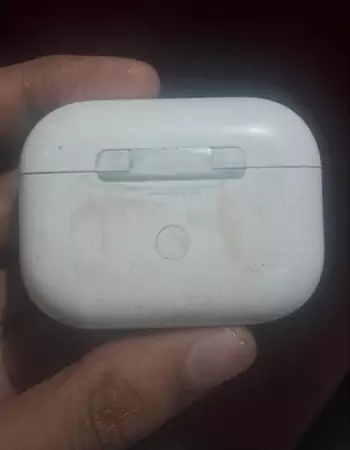
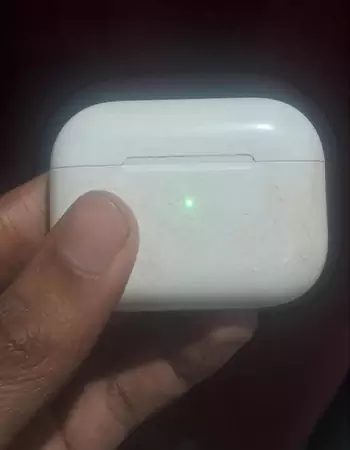
- This will completely reset the pairing.
- You can now reconnect your AirPods to your device.
This should clear up most sync and connection type issues.
Cleaning AirPods to Fix Sound Issues
Cleaning is often something that gets ignored; however, sometimes cleaning can resolve many different types of sound issues very quickly.
Speakers may have speaker mesh (the grille) with a buildup of dust or even ear wax, blocking the opening and restricting or completely shutting off sound from being heard from the speaker.
Use a soft, dry brush or cloth to carefully clean the speaker mesh. Do not use liquids or sharp objects when cleaning, as these items can cause damage to the internal parts of the speaker.
When One AirPod Needs Replacement?
In cases where troubleshooting did not solve the problem, a new pair of AirPods should be purchased.
- Continual connection issues: If an AirPod continuously fails to connect after going through all troubleshooting steps, it may be damaged inside.
- External damage: Physical damage or water exposure will cause permanent damage to the device and will not reverse its functionality.
- Battery issues: If an AirPod is draining its battery quickly or won’t charge correctly, you will need to purchase a new one.
Suggested Read: iPhone Mail Not Updating? Here’s Why & How to Fix It
Repair vs Replacement: What’s the Better Option?
Repair and replacement both can take place depending on your situation so let’s take a look at their pros and cons.
| Option | Pros | Cons |
| Repair AirPod | Cheaper | Depends on Damage |
| Replace AirPod | Instant Fix | Higher Cost |
Check this out: Phone Not Ringing? Common Reasons, Fixes, and When to Get Help
How to Prevent AirPod Connection Problems?
The best way to avoid problems later on is to prevent them from happening initially.
1) Proper charging habits
Placing both AirPods in their charging case correctly will help ensure that they both receive an even charge.
2) Clean AirPods
Cleaning your AirPods regularly prevents dust accumulation that may cause sound interference or obstruct the contact points for charging.
3) Avoid Bluetooth conflicts
If you have multiple Bluetooth devices, disconnect from those which you do not use so that your AirPods maintain a stable connection.
Fix One AirPod Not Working the Right Way
Simple troubleshooting steps, such as cleaning AirPods, resetting them, and reconnecting them, can often resolve most issues with one of your AirPods not working.
Taking action quickly can help prevent further problems and eliminate any unnecessary costs associated with replacing your AirPods. If all attempts to fix the issue have been unsuccessful, you may need to look into getting a professional to either repair or replace your AirPods.
Read More: How Much Does It Cost to Repair a Phone Screen? Average Repair & Replacement Costs
FAQs
Q: Why is one AirPod not connecting?
Q: Why is my left AirPod not charging?
Ans: Your charging case cab debris or its battery has been damaged which stops the left AirPod from charging correctly.
Q: Can one AirPod be replaced individually?
Ans: Yes, Apple offers individual AirPod replacement, but it must match your model and be paired correctly after purchasing the new one
Q: How do I fix AirPods when only one works?
Ans: You can reset AirPods, clean both earbuds, check balance settings, and reconnect to fix the issue of one AirPod not working.
Q: Why won’t my AirPods connect?
Ans: Outdated software, Bluetooth issues, low battery, or pairing errors can prevent AirPods from connecting to your device properly.
Source:
If your left or right AirPod isn’t working by Apple Support