

Ans: No, the digital pencil does not support or respond to the capacitive touch screen tech of the iPhone. So you cannot use it on any sort of iPhone generation.
Does Apple Pencil Work on iPhone? Compatibility & Best Alternatives
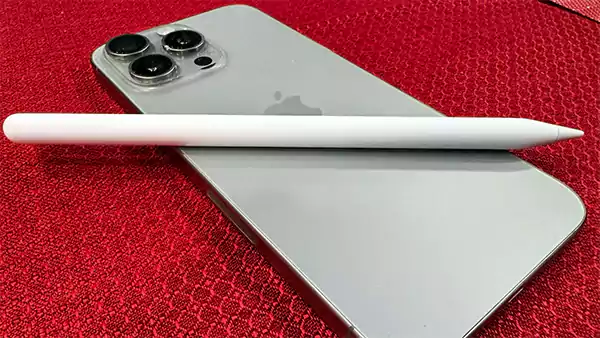
If you are wondering, does Apple Pencil work on iPhone or not, here’s an honest answer: no, it doesn’t. Surprising right! Many people expect the same smooth drawing or taking notes experience on their phones, just like an iPad. However, in terms of using the Apple Pencil, the iPhone lacks the required touchscreen technology.
Impressively, you are still not out of options. Basic stylus pens or third-party alternatives are here to the rescue, allowing you to draw, write, and navigate your phone screen with top-notch accuracy.
Thus, still curious to know the detailed answers to “Can you use Apple Pencil on iPhone?” Keep reading to learn more about the compatibility details and discover the best alternatives to upgrade your experience.
Quick Answer:
Does Apple Pencil Work on iPhone? A simple answer to, “Can you use an Apple Pencil on an iPhone?” is No! Apple Pencil (all generations) does not support any iPhone device. It can neither be connected nor paired, as it requires advanced screen tech found only on certain iPads.
Table of Contents:
- Why Apple Pencil Doesn’t Work on iPhone?
- Can You Connect Apple Pencil to iPhone?
- Will Apple Pencil Work With iPhone in the Future?
- What Happens If You Try Using Apple Pencil on iPhone?
- What are the Alternatives Stylus That Works on iPhone?
- Should You Use a Stylus on iPhone?
- Devices That Support Apple Pencil
- Frequently Asked Questions
Why Apple Pencil Doesn’t Work on iPhone?
The Apple Pencil doesn’t support any iPhone device because the iPhone usually lacks the specialized electromagnetic digitizer hardware, which is required to detect the digital pencil pressure, tilt, and given command.
Notably, both an iPhone and iPads are built differently, using distinct screen tech. For instance, the iPhone employs a capacitive touchscreen, which detects and responds to the electric charge caused by your finger traces.
Whereas, iPad’s hardware implies multiple setups and a special sensor to accurately determine the Apple Pencil command. Thus, due to this dissimilarity, the iPhone’s hardware fails to respond to the Apple Pencil inputs.
Also Read: How to Copy and Paste on Mac? 8 Must-Use Methods for Mac Users
Can You Connect Apple Pencil to iPhone?
If you are continuously searching for “How to connect Apple Pencil to iPhone?”, here is your answer. There is no way you can connect your digital pencil with your device, as it does not have the simple tech, such as.
❌ No Bluetooth pairing availability.
❌ No wired connection can be made.
❌ No charging support built into iPhones.
Hence, evidently, Apple Pencil is strategically designed only for iPads and comes with a limited screen barrier.
Will Apple Pencil Work With iPhone in the Future?
As of now, Apple Inc hasn’t made any official confirmation regarding whether an Apple Pencil will be supported on iPhones in the future or not. However, according to the 2025 patent findings, the company is developing a next-generation Apple Pencil with broader compatibility, breaking the screen barrier that is limited to iPads only.
Therefore, this means that in the future, using new generation devices, you may use the digital pencil on your iPhone and even on Mac screens.
Also Read: How to Change the Password of a Phone on Android and iOS?
What Happens If You Try Using Apple Pencil on iPhone?
As aforementioned, Apple Pencil only supports the iPads. If you try using it on an iPhone, it simply won’t work. The screen will stay unresponsive, there won’t be any pairing options available, and the digital pencil acts like a non-functional object for your device.
So, whether you try to record a call on an iPhone or want to set an iPhone wallpaper dimension using an Apple Pencil, it will eventually fail.
What are the Alternatives Stylus That Works on iPhone?
Stylus pens are generally categorized into two types: active (Bluetooth-based) and capacitive (basic). They are specially designed to offer higher precision and accurately mimic your finger input, so that these digital pens can be easily used on all generations of iPhones.
Therefore, whether you want to sign a document, draw doodles, or simply want to navigate your phone, you can use any stylus on your device and enjoy the same smooth experience as the Apple Pencil.
Apple Pencil vs Stylus for iPhone (Comparison Table)
Below, we have broken down a simple comparison between the Apple Pencil and the Stylus; take a look for a more precise understanding.
| Features | Apple Pencil | iPhone Stylus |
| Works on iPhone | ❌ | ✅ |
| Pressure Sensitivity | ✅ | ❌ |
| Tilt Sensitivity | ✅ | ✅ |
| Palm Rejection | ✅ | ✅ |
| Charging Method | Plugging its Lightning Connector or Wirelessly via Magnetic Attachment (depending on the generation) | Magnetic Wireless Charging, USB-C/Micro-USB Cable, or Device-Integrated Slot (depending on the model) |
| Precision | High | Medium |
| Compatibility | iPad only | All Smartphones |
Should You Use a Stylus on iPhone?
Just like any other technology, a stylus also has two sides. Along with the numerous benefits, it comes with several limitations. Below, we have mentioned them both for you; take a quick look.
1. A Digital Stylus Good For
Supportive of all iPhones, a Stylus is good for various purposes, such as:
- Quick Sketches
- Taking Notes
- Signing Documents
- Navigation, and
- Precision Tapping
2. A Digital Stylus Not Good For
You should avoid using a stylus for:
- Professional Drawing
- Advance Graphing
- Gaming
Briefly, we can say that a stylus is a convenient option to use for day-to-day purposes and may be hard to use for fast, high-speed input or conversational scenarios.
Read More: One AirPod Not Working: Complete Troubleshooting Guide
Devices That Support Apple Pencil
Apple Pencil is specifically designed for iPad models; however, it works only on selected generations. Here, we have presented a thorough table of which Apple Pencil supports which iPad generation. Check it out.
Apple Pencil Pro (can be used on the following generations along with the iPadOS 17.5 or later)
- iPad mini (A17 Pro)
- iPad Pro 13-inch (M4 and M5)
- iPad Air 13-inch (M2, M3 and M4)
- iPad Pro 11-inch (M4 and M5)
- iPad Air 11-inch (M2, M3 and M4)
Apple Pencil (USB-C) (can be used on the following generations, along with the iPadOS 17.1.1 or later)
- iPad mini (6th generation)
- iPad mini (A17 Pro)
- iPad Pro 13-inch (M4 and M5)
- iPad Pro 11-inch (1st, 2nd, 3rd or 4th generation)
- iPad Pro 11-inch (M4 and M5)
- iPad Pro 12.9-inch (3rd, 4th, 5th or 6th generation)
- iPad (10th generation)
- iPad (A16)
- iPad Air (4th or 5th generation)
- iPad Air 13-inch (M2, M3 and M4)
- iPad Air 11-inch (M2, M3 and M4)
Apple Pencil (2nd generation)
- iPad Pro 11-inch (1st, 2nd, 3rd or 4th generation)
- iPad Pro 12.9-inch (3rd, 4th, 5th or 6th generation)
- iPad mini (6th generation)
- iPad Air (4th or 5th generation)
Apple Pencil (1st generation)
- iPad Pro 9.7-inch
- iPad Pro 10.5-inch
- iPad Pro 12.9-inch (1st and 2nd generation)
- iPad mini (5th generation)
- iPad (6th, 7th, 8th and 9th generation)
- iPad Air (3rd generation)
- iPad (10th generation)
Next Read: How to Check RAM in Windows and MacOS?
Frequently Asked Questions
Q: Can you use an Apple Pencil on an iPhone?
Q: Does the Apple Pencil work on an iPhone 14/15?
Ans: No, iPhone 14/15 does not have the required electromagnetic digitizer hardware, which is specifically required to use the Apple Pencil.
Q: How do you connect Apple Pencil to iPhone?
Ans: Apple Pencil does not support any iPhone generations, so it is not possible to connect it to your device.
Q: Is there an Apple Pencil alternative for iPhone?
Ans: Yes, you can use any third-party capacitive stylus (a digital pen) to navigate your iPhone smoothly and accurately, just like the Apple Pencil. For instance, Adonit Neo Duo, MEKO Active Stylus, Logitech Crayon, Adonit Dash 4, and Generic Capacitive/Disk Styluses are some top alternatives that you can employ.
Q: Why doesn’t Apple Pencil work on iPhone?
Ans: To use the Apple digital pen, a device must have specialized electromagnetic digitizer hardware that detects the digital pen pressure, tilt, and command, which is usually lacking in the iPhone’s built-in hardware.
Q: Will Apple Pencil work with iPhone in the future?
Ans: There is no official confirmation made by Apple Inc till now. However, according to the 2025 patent, the company is developing the latest Apple Pencil generations with broader compatibility that may work with the iPhone and Mac screens too.
Sources:
Apple Pencil Compatibility: Apple Support