Ans: Keep your data roaming off most of the time and enable it only when it’s needed the most, like when travelling, taking calls in Wi-Fi restricted zones, etc. Otherwise, keeping it on 24/ 7 enabled will only cause an increase in battery drain and data bills.
What is Data Roaming? A Complete Guide to Understanding Roaming and Data Roaming

Updated On September 26, 2026

Have you seen a sudden change in your data usage, a message pop-up, and fluctuations when placing calls or texting someone while being in a different corner of the world?
Actually, this happens because of a smartphone feature that we often don’t use properly and thus suffer from an expensive billing cycle after completing the travel. So, to clear up your confusion, this article by Devicefixes explores what is data roaming along with its vital functions, advantages, and disadvantages.
Quick Answer
Data Roaming Meaning: Data Roaming is a special connectivity feature that often gets automatically enabled on a mobile device whenever your device leaves your nearby network range and connects to different telecom carriers’ areas. You can easily enable/disable this feature according to your preferences.
Table of Contents:
What is Data Roaming? Meaning and How It Functions
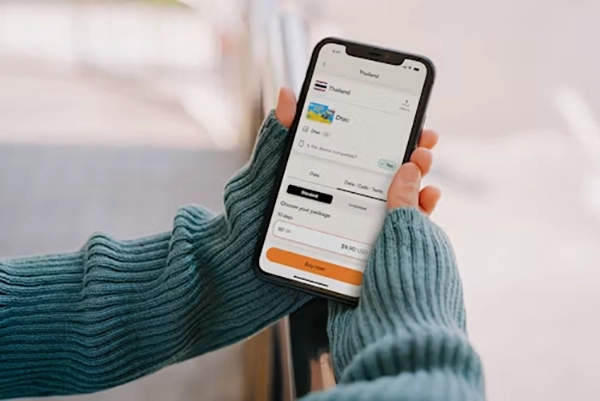
Data roaming is a unique mobile feature that gets automatically enabled on your mobile devices whenever you are travelling to a different foreign location to use different network aggregation carriers and allows you to make calls, send messages, and use data for all your essential needs.
This happens because of multi-corporation deals between different network service providers around the globe and ever-growing technology of phones, which are able to work with varied network strengths like 2G, 3G, 4G, and 5G.
Although this feature is very useful for regular travellers, nomad working professionals, and researchers who are visiting different places, it has a downgrade which many people don’t like.
Whenever your device leaves the home carrier to establish network connectivity, this feature uses different signal options to retain the strength and optimal signal variables from nearby receivers.
In domestic areas, this constant hop-on and hop-off is completely free, but due to restrictions in international domains and their special charges, calls, data, and messages become expensive. But that’s not the only downside; there are some other aspects that also make it a bit formidable for everyday usage.
The Downsides and Risks of Traditional Data Roaming
Data roaming is undoubtedly an exceptional feature that is present in the main settings catalog instead of Developer Options that empowers smooth overseas connectivity, but it has some downsides that no one can easily ignore, and most of them are faced by users daily.
- Expensive Roaming Cost: The most talked-about issue about data roaming revolves around expensive roaming costs imposed by almost every major service provider. They can charge up to $2 to $20 per megabyte (MB) of data, which is nothing but insane. Most people avoid using data roaming for this very reason and prioritize finding WiFi nearby, which is wise.
- Hidden Carrier Blocks: Many prepaid SIMs or outdated carrier networks do not feature data roaming services, so many people cannot use the internet for essential connectivity using this even willingly, and telecom brands force them to upgrade plans or SIM cards for these services.
- Plan Limitations: Data roaming is considered an exclusive feature due to its ability to provide a lossless overseas connection, and here’s why it is only usable to users who have opted for premium plans. Many basic telecom plans don’t include data roaming in their monthly packs, which is why many beginner travellers have to set aside extra money for roaming bills after they return home.
- Exposing Threats: Connecting to the network signal in unknown areas makes your device security completely vulnerable because in some countries, using mobile data or any other services is not advisable. You should always research the connectivity parameters before visiting unknown places and then consider enabling data roaming.
- Awkward Billing Cycles: Unlike your regular dated billing cycle countdowns, you will see unwanted bill pop-ups and notification which says “You have a pending payment” from your telecom service providers. This scenario is frustrating and can ruin your monthly expenses in a moment. If you don’t pay roaming bills on time, then your telecom services will be suspended till you clear the backlog.
- Slow Internet Speeds: Due to constant switches in terrain and multiple signal changes, you will definitely experience a loss in internet speed while using data roaming in tasks like posting photos, sending emails, video calls, or any other internet activity. Although this problem is temporary in most regions, in some areas people have to deal with it for their entire trip.
- Battery Drain: Lastly, even after you face these challenges, there is a hardware problem waiting for you. Usage of additional features like data roaming enables background data usage, constant incoming or outgoing messages, and strong network speeds. All these functions collectively put a load on the phone’s battery, and you will suffer from poor battery backup throughout the journey if you haven’t done appropriate device settings on your mobile yet.
Read more: Best Budget Smartphones in the USA for Daily Use and Gaming
How to Get Online Without Paying Roaming Fees (Smart Traveler Solutions)

Well, if you want to save a lot in your travel budget or want to stay protected from foreign intruding network setups that can harm your device data, then you must try these features, which will help you use the internet with complete security and affordability. Read all of them carefully for the best execution.
- Use Travel eSIM: Opting for an eSIM is one of the best decisions you can make while going for international travel, as it is the best temporary solution and you eliminate the hassle of handling multiple physical SIM cards. You can also turn off your primary SIM for a while, which will help you to achieve more isolation from the daily chaos of business meetings and calls.
- Rely on WiFi Available on Your Stays: While you are in your hotel, it is mostly recommended by every other traveller to use that free WiFi as much as possible because it can save your lot of time and money. You can download your playlist tracks instead of streaming them through cellular data, and install important tools like calendars, destination photos, location coordinates, and many more things.
- Prioritize Using Offline Versions of Important Tools: Instead of using online variants of essential apps like Google Maps, dictionaries, contact and, etc so that you don’t have to turn on mobile data over and over again for multiple purposes. This way, you will save on both data bills and overall battery usage.
- Buy a Local SIM: Lastly, if any of these solutions don’t work for you, then buying a local SIM will surely do. Here you can use local networks with the best speed possible along with minimal costs and limitations. You need to make sure of only one thing: choose a trusted local telecom operator and read at least 50-100 local reviews before making a final decision.
How to Monitor and Reduce Mobile Data Usage While Roaming
If you want to reduce your mobile data usage while using roaming features, then there are some effective ways that can be implemented in your devices. Follow these methods to enable the best solutions on your device on the go!
Monitor Data Usage on Android
Monitoring the data usage on Android by looking at the stats presented by your device is the best way to understand what is actually causing data bills to spike up and lets you disable the unwanted apps that are consuming internet for no reason at all. Read these navigational steps below to reach data stats on your phone.
- Open Settings
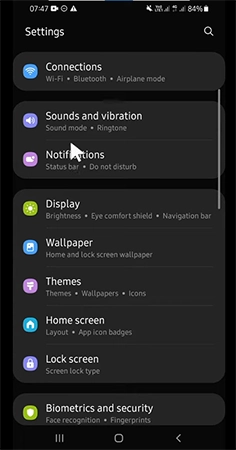
- Tap on Data Usage
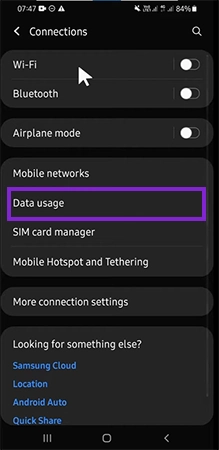
- In this section, your device will show the complete monthly data usage of the device, including both SIM cards,
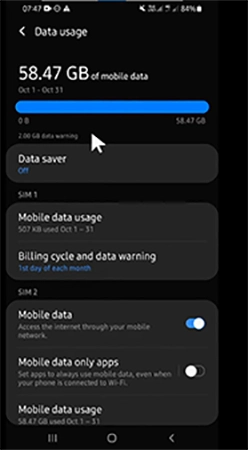
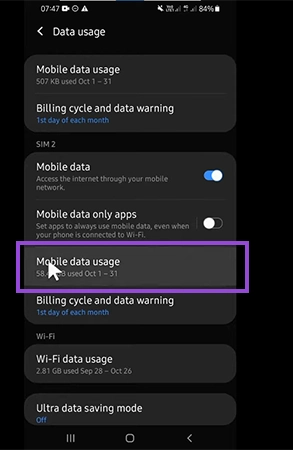
- For more accurate measurement, you can check the data usage of each SIM card. For example, click on Mobile Data Usage in the SIM 2 section.
- Here you will see all the apps and system settings that are using data from SIM 2.
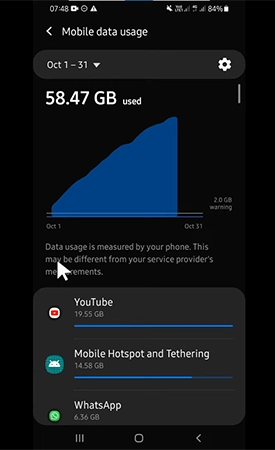
Now, you will get complete clarity about which apps are using your device data the most, and you can easily disable/enable their background usage according to your preferences.
Activate Data Saver Mode
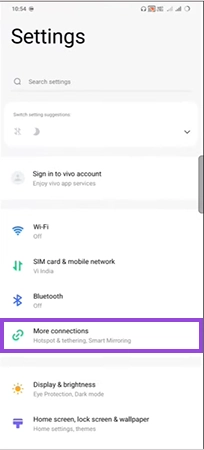
The best thing which you can do while using data roaming on your mobile is enable Data Saver mode right away because it clearly reduces the expensive costs and also improves your overall battery backup throughout the journey. It limits background activity of unwanted apps or games and uses data only for important functionalities of the device. Follow these easy steps below to use this feature.
- Open Settings
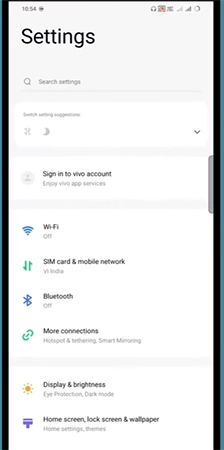
- Tap on More Connections
- Tap on Data Saver Option.
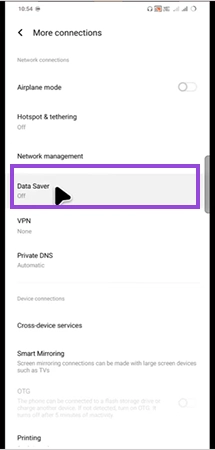
- Then enable this toggle

Important Note
You can also use Data Saver mode for only specific apps that consume a lot of cellular data by going to in-app settings and seeing the appropriate options for limiting their usage. The app you restrict from consuming regular data might not work properly because of insufficient internet you’re giving it.
Read more: How Do You Turn Safe Mode Off on an Android? (Step-by-Step Guide)
Conclusion
Here’s the recap of the complete data roaming definition, where you have learned how to use it, when to use it, and especially when not to use it. It is undoubtedly one of the most practical utilities that your smartphone offers, but due to high roaming charges imposed by telecom companies, it becomes double edge sword for most users across the globe. But there are some other ways which allows you to access the internet on your journey without opting for high-paying data roaming. These include options like using WiFi available on stays, offline modes of essential apps, local SIM cards, and best of all, enabling a temporary eSIM.
If you simply want to save some money on data roaming and don’t want to go for these types of methods, then you should enable simple settings on your phone, like turning off background data usage and activating data saver, to save both data and battery on your journey. Also, don’t forget to follow Devicefixes for more such exciting articles
FAQs
Q: Do I want data roaming on or off?
Q: What happens if I use data roaming?
Ans: Well, if you constantly use data roaming while travelling internationally, then you will receive a very costly data and call bill, which can make your overall travel too expensive and make you spend more on these telecom compliances rather than new experiences.
Q: Is data roaming free?
Ans: No, data roaming is not free, infact it is one of the most expensive telecom services that can be used in mobile. Use it only in vital scenarios for calling, texting, or using the internet for major tasks like finding locations, sending an emergency SOS, and downloading credentials.
Q: What are the disadvantages of data roaming?
Ans: The major disadvantage of using data roaming is that it exceeds the cost of data and calling while also making your device vulnerable to foreign online threats. Always try to prioritize the usage of WiFi instead of data roaming for transferring or receiving data in international domains.
Q: Does airplane mode turn off data roaming?
Ans: Yes, airplane mode can turn off data roaming as it blocks all the radio connectivity features like calls, messages, and mobile data. It simultaneously disables data roaming also and when you disable aeroplane mode, you can turn on this feature again to use your data in different terrains.
Q: What are the disadvantages of data roaming?
Ans: The major disadvantage of using data roaming is that it exceeds the cost of data and calling while also making your device vulnerable to foreign online threats. Always try to prioritize the usage of WiFi instead of data roaming for transferring or receiving data in international domains.
Q: Does airplane mode turn off data roaming?
Ans: Yes, airplane mode can turn off data roaming as it blocks all the radio connectivity features like calls, messages, and mobile data. It simultaneously disables data roaming also and when you disable aeroplane mode, you can turn on this feature again to use your data in different terrains.