

Ans: No, the Apple Watch does not officially support Android phones and requires an iPhone for setup, syncing, updates, and most features.
Does Apple Watch Work With Android? Compatibility, Limitations, and Alternatives of Apple Watch
Android users often wonder does Apple Watch work with Android. The answer is yes, but not all the features can be accessed like they can with an iPhone. The Apple Watch ecosystem was designed by Apple to work only with Apple iPhones, which naturally reduces the level of compatibility with Android devices.
Some limited alternatives are out there for connecting your Apple Watch to an Android device, but they are generally only partially functional and not meant to be used on a regular basis. This guide will explain to you how Apple Watch compatibility works and what features you can expect to be able to use via Android.
Table of Contents:
Does Apple Watch Work With Android Devices?
Apple does not currently support the Apple Watch being paired/used with Android smartphones. In order to set up and utilize the majority of the Apple Watch’s functions, you must have an iPhone.
The Apple Watch is very dependent on using various different services that are all part of the Apple product ecosystem, such as iCloud, iMessage, FaceTime, Apple Health, and the Watch app, which is only available to iOS devices. Not to mention, if you know how to record a phone call on iPhone, it could further be played on the Apple Watch.
Regardless of this fact, there have been individuals who have reported using certain limited functions of the Apple Watch on Android devices through different means. The majority of these users utilize a:
- Cellular-enabled Apple Watch
- Activate the Watch using an iPhone first
- Once activated, return the SIM card to the Android phone
As reported by users, using an Apple Watch in conjunction with an Android device is not a seamless experience at best. Notifications, syncing, app installation, and health integration may not function properly.
To answer your question, does the Apple Watch work with any Android device? The short answer is yes, but it’s tricky. The Apple Watch is designed primarily for iPhone users, but it can be connected to Android; only basic tasks can be done, and it can’t be used to its fullest potential.
What Features are Usable, Missing, and Restricted When Using an Apple Watch With Android
Despite a few limited options to connect to the Apple Watch LTE network while also using an Android device, most of the great features that the Apple Watch provides simply do not work without an iPhone. Let’s see what features are functional, missing, and restricted when using the Apple Watch with an Android.
I. Usable Features
Although the Apple Watch does provide some very limited LTE options, the only things that work without an iPhone are:
- Telephone calls
- Basic text message capabilities
- Cellular service (4G LTE required)
- Music that has been downloaded through iTunes
- Basic Workouts
Remember that these features are accessible via the watch’s cellular (4G LTE) connection (4G LTE required).
II. Missing Features
Without an iPhone, the following premium features of the Apple Watch will not work properly.
- Apple Health App sync
- Siri
- Apple Wallet
- iMessage
- WatchOS Updates
- Advanced health monitoring
III. Restrictions with Apple Watch App
Additionally, there is no ability for users to download the Apple Watch app from the App Store. Therefore:
- No installation or management of apps
- Customize watch faces
- Change notification settings
- Update software
- Control advanced watch settings
The Apple Watch is ultimately made for Apple’s ecosystem and that is why all Android users do not have all of the premium features and the usage of the Apple Watch on an Android device has major limitations.
Also Read: iPhone Wallpaper Dimensions: Complete Guide to iPhone Wallpaper Size & Resolution
How to Use an Apple Watch With Android Phone?
Although Apple does not officially allow Android compatibility, there is a workaround for LTE-enabled Apple Watches. This method is complicated and still provides limited functionality.
1. By Using Cellular/Changing SIM Card
Users can connect an Apple Watch to an Android phone by switching SIM cards. Here’s what to do:
- Insert a SIM card into the iPhone and set up the Apple watch with the iPhone
- Activate cellular connectivity on the Apple Watch
- Move the SIM card back to the Android device
- Use the watch independently over LTE
2. By Using a Third-Party App
Now, there’s an app called Merge, which can be used to connect your Android device with an Apple Watch, and it will give you access to some standard apps that you won’t get with the regular setup. To use it, follow the steps below:
- Set up the Apple Watch with an iPhone first.
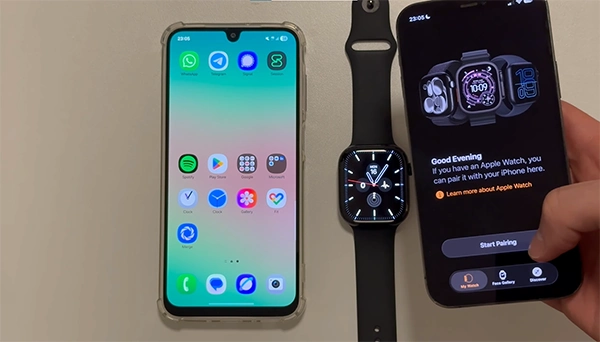
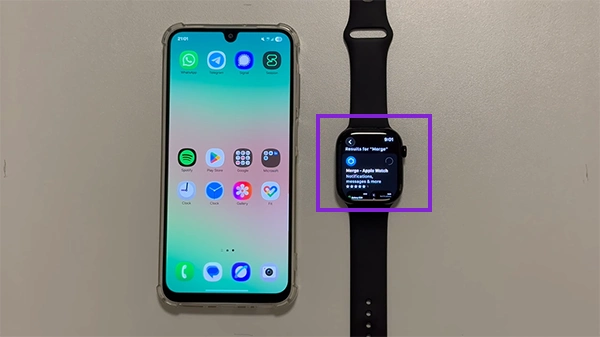
- Download the Merge app on your Android phone and Apple Watch.
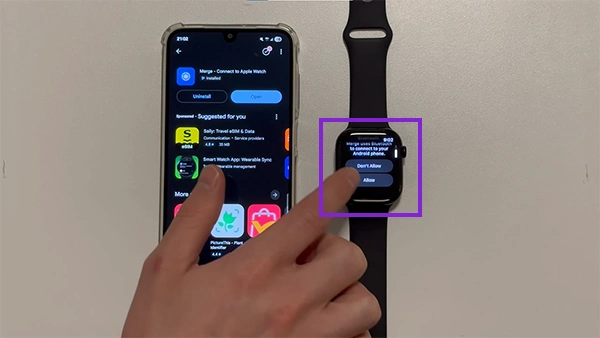
- Enable Bluetooth, notifications, and required permissions on both.
- Once the permission has been approved, your phone will automatically appear on the Apple Watch.
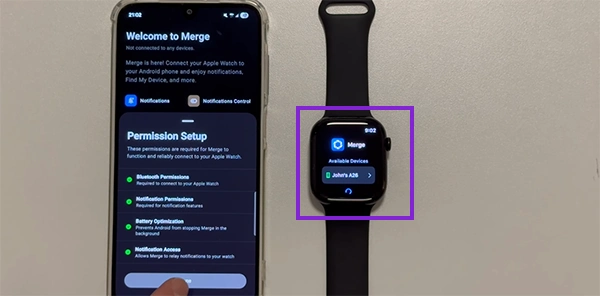
- Click on your device which is showing on the watch and you’ll receive a pin which you have to add on your phone.
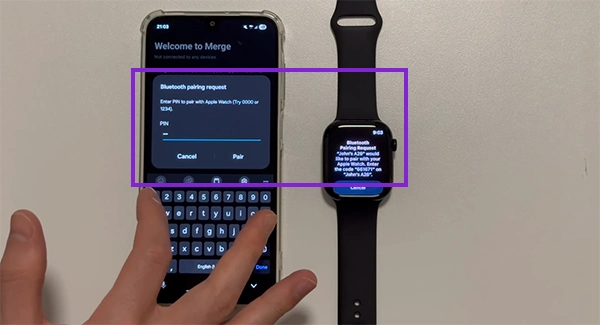
- After entering the pin wait few seconds and your Android phone will be connected to Apple Watch.
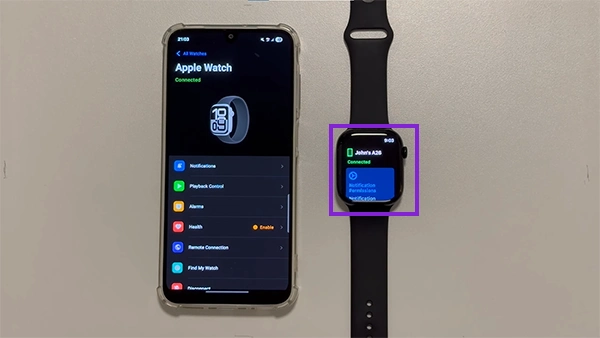
By using Merge you’ll have access to Basic notification syncing, Call alerts, Limited message access, and more. But, you still wouldn’t be able to access all the features.
3 Best Alternatives to Apple Watch for Android Users
Opting to get an Android-specific smart watch will create an entirely different user experience when compared to a watch designed specifically for another OS, particularly for those who use Android as their main mobile OS.
1. Samsung Galaxy Watch Series
The Samsung Galaxy Watch series of smartwatches offers a fully integrated experience with the Android latest versions. These experiences are offered through:
- Highly developed health metrics
- Google Assistant compatibility
- Google Wallet’s ability to make purchases from the watch
- Long-lasting battery life
2. Google Pixel Watch
The Google Pixel Watch is designed to integrate with Android apps and services provided by Google.
Some of the benefits of using a Google Pixel watch include:
- Native Wear OS support
- Integration with Fitbit
- Access to Google Maps and Google Assistant
- Smooth integration with Android
3. Garmin Smart Watches
Garmin smart watches are great for users of Android with fitness interests.
Common features of Garmin smartwatches include:
- Long battery life
- Comprehensive fitness tracking
- Accurate GPS
- Extensive Android capabilities
Also Read: How to Change the Password of a Phone on Android and iOS?
Conclusion
So, this answers the question, Does Apple Watch work with Android? It does; however, only a limited number of features will work on the device. Still, there are workarounds available, but Apple has never officially supported this type of pairing.
To use your Apple Watch as intended, you’ll need to use an iPhone for things like initial setup, data syncing, notifications, installing apps, tracking activities, etc. While there are some workarounds for LTE on an Android phone, you probably won’t get the best experience by using your Apple Watch this way.
FAQs
Q. Does the Apple Watch work with Android phones officially?
Q. Can I use an Apple Watch without an iPhone?
Ans: Yes, but only limited LTE features work after setup with an iPhone, making the overall experience incomplete for regular users.
Q. Does the Apple Watch work with Samsung phones?
Ans: No, Samsung phones cannot fully pair with Apple Watch because Apple restricts compatibility mainly to iPhones and Apple services.
Q. Can Android users receive calls on an Apple Watch?
Ans: Yes, Android users can receive calls on LTE-enabled Apple Watch models after setup, but functionality remains extremely limited overall.
Q. Which smartwatch is best for Android users?
Ans: The Samsung Galaxy Watch and Google Pixel Watch offer excellent Android compatibility, health tracking, app support, and seamless smartphone integration.
Q. Does Apple Watch work with Android through Bluetooth?
Ans: No, Bluetooth alone cannot fully connect the Apple Watch with Android because Apple requires iPhone-based setup and ecosystem integration.
Source:
Is the Apple Watch compatible with Android OS by Apple Support Community