iOS security is better because it gives a consistent and secure default environment. Android phones give equally strong protection on select flagship devices (like Google Pixel or Samsung Galaxy) when properly configured.
Android vs iOS Security: Which Mobile OS is Safer?

Updated On November 26, 2026
Both Android and iOS provide strong protection for your data, but how they do so varies. Apple has a controlled ecosystem where security patches, updates, and features are delivered to all iPhones altogether. Google is an open-source platform where your data protection depends on the brand and settings.
How Android vs iOS security varies is important because our smartphones store everything from credentials to sensitive data. In this article, we will compare Android Security vs iPhone security so you know what really keeps your phone safe.
Table of Contents:
Quick Overview: Android vs iOS Security
As our smartphones hold everything from banking credentials to biometric identities, it is important to analyse an Android vs iOS security comparison. A common question every phone buyer has is, “Is Apple more secure than Android?” The iPhone does offer stronger security because Apple controls both its hardware and software. But certain Android phones like Google Pixel and Samsung Galaxy can match or even exceed iOS security when properly configured.
No operating system is completely immune to cyber threats. Your real-world safety also depends on how you use your devices and apps.
Android Security
Android is built on an open-source foundation. And because of this, thousands of security researchers worldwide can inspect its code to spot and fix weaknesses quickly.
Google relies on automated cloud scanning and built-in anti-theft tools that lock down your device if it is stolen to keep users safe without restricting how they use their phones. The level of protection depends on which brand you choose and how careful you are with downloads.

iOS Security
iOS is built on Apple’s famous “walled garden” approach. Apple designs the hardware and the operating system together under one roof, and this makes a tightly controlled environment. According to Apple’s official Platform Security, this starts with hardware security through a silicon foundation. The next layer is system security. This ensures the operating system runs safely and blocks unauthorized code from changing core software. Also, every file on this device is encrypted. App security keeps every program from interfering with data of other programs, so if one app has a flaw, it cannot spread to the rest of your iPhone.
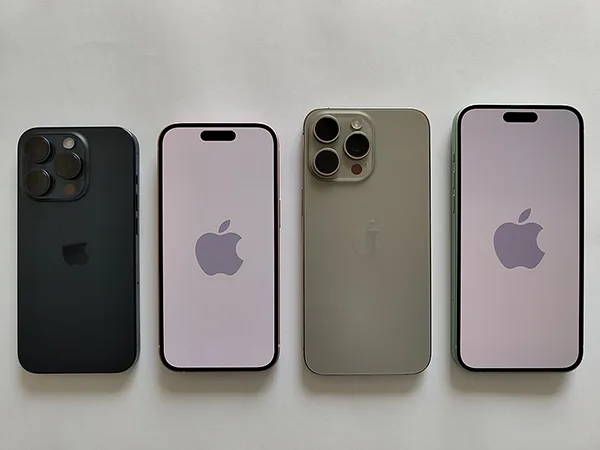
Android vs iOS Security Comparison Table
| Security Feature | Android Security | iOS Security |
| System Design | Open-source platform used by hundreds of phone makers. | Closed ecosystem controlled by Apple. |
| Hardware Security | Dedicated security chips for high-end phones. | Every modern iPhone has Apple’s isolated Secure Enclave chip. |
| Software Updates | Updates vary by brand and carrier. | Apple sends simultaneous security updates to all supported iPhones. |
| App Downloads | Google Play Protect scans apps. It allows third-party app stores. | Apps downloaded via the App Store are only isolated in secure sandboxes. |
| On-device Encryption | File-based encryption | Hardware-accelerated encryption |
| App Permissions | Android gives granular controls like one-time access, every-time access, etc. | Requires external approval for tracking and data access, which is usually backed by App Tracking Transparency. |
Android Security vs iOS Security Detailed Comparison
Both Android and iOS operating systems protect your personal data well; the question is how differently they defend your phones.
Apple locks down every part of the iPhone to give uniform safety across all iPhones. Google relies on a flexible system. It heavily relies on which phone brand you buy.
But is an iPhone more secure than Android? The following are the 7 pillars of mobile defense that compare Android vs iOS security.
Hardware Security
Hardware security protects your phone’s most sensitive data. An isolated physical chip stores all your passcodes, passwords, fingerprints, encryption keys, etc. And because it is isolated, hackers and malicious apps cannot access your credentials even if the phone’s software is affected.
Android Hardware Security
Depending on the phone manufacturer and price tier, Android devices include dedicated security chips. For example, Google Pixel phones have Titan M2 that protects biometric data.
Many budget and mid-range Android phones lack these security chips that make them less secure.
iOS Hardware Security
The iPhone is known for its advanced security and for hardware-level security. Apple uses a uniform Secure Enclave through every modern iPhone. This co-processor can be found in every A-series and M-series chip, i.e., even older and lower-cost iPhones get the same level of hardware security.
Software Updates
Software updates are much more than just adding new emojis and visual changes. Google and Apple release frequent software updates to patch up discovered system flaws before hackers can exploit them. Keeping software up to date is important because any loopholes are fixed and your phone becomes more secure than before.
Android Software Updates
Because Android runs on hundreds of different phone models made by various companies, security updates do not reach everyone at the same time.
Google releases monthly Android security patches and delivers them through Google Play system updates. Flagship phones like the Google Pixel and Samsung Galaxy receive fast monthly updates for up to seven years, but many budget and mid-range Android devices face delays in getting security support and the latest Android version.
iOS Software Updates
iOS software updates roll out directly from Apple at the exact same time for all iPhones. There is no waiting for carrier approval. When Apple finds any vulnerability, it pushes an emergency patch to millions of devices worldwide. For example, its iOS 27.2.1 and iPadOS 27.2.1 security update rolled out across supported devices to patch Bluetooth, AirPlay, Messages, and more flaws.
Also Read: How to Change the Password of a Phone on Android and iOS?
App Store and Malware
Malicious apps are the easiest way to invade the security of mobile devices. The way the app store manages and allows app downloads is an important factor in Android vs iOS security. Software screening is done before it even reaches your screen to stop harmful programs from getting in.
Android App Store and Malware
Android allows users to download apps from the official Google Play Store. But apps can also be downloaded from third-party app stores and directly from the web. Though Google Play Protect scans billions of apps daily for harmful behavior, apps can be downloaded from unverified sources, making Android a much larger target for mobile malware.
iOS App Store and Malware
All apps on the App Store must pass Apple’s strict review process before users can download them. Every iOS app is signed by Apple and runs inside a sandbox that prevents it from accessing data from other apps or operating systems. That’s what makes iOS apps more secure.
Note: Even in regions like the European Union where Apple allows third-party apps, every app still undergoes automated and human checks for malware before installation.
App Permissions
App permissions control what personal information and hardware features an app can access. These include your microphone, camera, location, contacts, etc. Allowing only the necessary permission keeps your information safe from malicious or overly nosy apps spying on you.
Android App Permissions
Android gives users granular control over how and when apps access data. You can grant permissions only while using the app, grant one-time access, or let the system automatically reset permissions if you have not opened the app in a few months.
Android also displays a green indicator dot in the corner of your screen whenever an app turns on your camera or microphone. Its Privacy Dashboard lets you review a timeline of which apps accessed your data.
iOS App Permissions
Like Android, iOS also grants one-time permissions, approximate location sharing, and orange and green status dots whenever your microphone or camera is active. Also, Apple enforces App Tracking Transparency. It forces apps to ask for your permission before tracking your activity across other apps and websites for targeted ads.
Cloud Backups
Cloud backup keeps copies of your photos, messages, contacts, app data, etc. online so you can restore them if you lose your phone. And because hackers target cloud accounts to steal personal information, having cloud backups with strong encryption is important.
Android Cloud Backups
Google One is where Android backs up and encrypts your phone data. Your backups are encrypted using your phone’s lock screen PIN, pattern, or password.
Also, files stored in standard Google Drive or Google Photos are encrypted with keys held by Google. This means Google can technically access them if required by law enforcement or if your Google account is hacked.
iOS Cloud Backups
iOS backs up your device to iCloud. It encrypts your data both during transfer and on Apple’s servers. iCloud Keychain passwords, Health data, and payment details are all under Standard Data Protection default settings. But iCloud Backup and iCloud Drive use encryption keys managed by Apple in its data centers.
Data Encryption
Data encryption scrambles all your information on your phone. This is a security system that helps to verify only trusted users get to access information. So, your messages, photos, passwords, etc. are all encrypted to maintain security.
Android Data Encryption
Modern Android devices use file-based encryption by default. It locks individual files with separate encryption keys that are tied to your lock screen PIN/pattern/password. So, when your phone is locked, your personal data stays scrambled until you enter your credentials.
iOS Data Encryption
iOS sets strong hardware-accelerated encryption automatically on every iPhone as soon as you set a passcode. Apple’s Data Protection system assigns a unique encryption key to every file on your device. The encryption key is linked to your passcode and the phone’s internal hardware chip. This makes it virtually impossible for hackers or forensic tools to bypass the lock screen and extract data from a locked iPhone.
Security Modes
Both Google and Apple provide security modes. These modes lock down vulnerable phone features and provide maximum protection against hackers.
Android Advanced Protection Mode
Android has Google’s Advanced Protection Program with native Advanced Protection Mode features in modern Android builds. When it is turned on,
- It blocks sideloading (no installing apps outside the Google Play Store).
- Allows Google Play Protect scanning.
- Disables 2G cellular network connections.
- No USB data access while the screen is locked.
- Requires security keys to log into Google Account.
Note: Google Pixel phones can also run a de-Googled operating system like Graphene OS for even stronger isolation.
iOS Lockdown Mode
iOS includes Lockdown Mode. It is an optional extreme protection setting built into iPhone, iPad, and Mac devices. It limits how apps, websites, and system features operate when enabled.
- Blocks message attachments and link previews in Messages.
- Blocks incoming FaceTime calls from unknown contacts.
- Prevents wired USB connections when the phone is locked.
- Stops installation of Mobile Device Management (MDM) configuration profiles.
Android vs iOS Security Summary
If you are the type of user who leaves your phone on its default settings, iOS is the safer choice for you because Apple controls both hardware and software. It provides simultaneous software updates across all supported iPhones, strict App Store screening, automatic encryption, and a better-controlled ecosystem.
Android provides granular privacy controls. When you stick to the official Google Play Store and understand its privacy dashboard, encrypted backups, and a modern Android phone protects your data just as effectively as an iPhone.
Whichever choice you make, remember to always keep your software updated and stay cautious of suspicious links or unknown downloads.
Frequently Asked Questions
Which is better: Android vs iOS Security?
Is iOS more reliable than Android?
Yes, iOS is comparatively more reliable than Android because of its consistent software performance and long-term update delivery. Apple builds iOS for a limited lineup of iPhones, and all supported devices receive operating system upgrades on the exact same day. Android gives delayed system updates on non-flagship phones.
Is iPhone 100% secure?
No, no iPhone or smartphone is 100% secure against all cyber threats. Yes, iOS uses strong hardware encryption, app sandboxing, and features like Lockdown Mode to block malware, iPhones can still be targeted by spyware and scam links.
What is the disadvantage of iOS?
The main disadvantages of iOS are limited customization and strict ecosystem restrictions. Android offers deep system personalization, whereas iPhones restrict how much you can modify the interface. Apple also limits third-party app sideloading.
Sources:
Built-in online security and protection – Google Safety Center
Hardware security overview – Apple Support
Advanced Protection Program – Google
About Lockdown Mode – Apple Support