Ans: True dead pixels usually cannot be fixed because they are hardware failures, but stuck pixels may respond to software or pressure methods.
What Is a Dead Pixel and How to Fix It?

Updated On May 6, 2026

Users often wonder what is a dead pixel? A dead pixel is a tiny, permanently unlit dot on your laptop or monitor screen that fails to display any color or light.
While it is normal to find one or two bad pixels in a monitor screen, having a lot of bad pixels can be distracting when you are trying to use the display. This article will cover what causes dead pixels, the different types of dead pixels, and some do-it-yourself repairs to use if you have dead pixels on your computer display.
Table of Contents:
What is a Dead Pixel on a Laptop Screen or Monitor?
A dead pixel is a pixel on an LCD or LED screen that can never turn on and will always be black because there is no current flowing to that pixel. When searching for what dead pixels are on a laptop screen, it refers to small dots that stay the same color and do not change with the content displayed.
Computer screen dead pixels are more permanent than temporary glitches and are usually a problem with the hardware.
How to Fix Dead Pixels on a Laptop Screen at Home?
Although repairing true dead pixels is typically complicated, some broken ones (especially stuck ones) can sometimes be repaired with simple techniques. It’s the same as an Acer flickering screen; there’s a possibility that it can be fixed with some DIY techniques, but it’s not guaranteed.
1. Applying Gentle Pressure Technique
By gently pressing the area with a soft cloth, you may be able to reactivate a stuck pixel. Do not use too much pressure, as this may further damage the screen.
2. Using Pixel Fixing Software or Tools
Using dead pixel detector software or other tools like Pixel Fixer and JScreenFix. They will rapidly cycle through different colors that will stimulate your pixels and are good for both fixing them and being able to verify whether or not you have dead pixels.
3. Running Screen Color Cycling Methods
For testing purposes, rapidly moving RGB color (also known as a ‘white pixel’ screen test) may help fix stuck pixels, but it will not repair completely dead pixels.
If all the previously mentioned methods don’t work, you will likely have an actual dead pixel and therefore require a professional repair service like DeviceFixes, who can replace your screen to fix the issue.
Also Read: How to Record a Phone Call on iPhone Without Hassle?
Types of Pixel Defects in Monitors and Laptop Displays

Now, here are the most common types of dead pixels that you might see on your screen. This includes:
1. Dead Pixels (Always Black)

Dead pixels are a type of pixel that do not work; dead pixels are completely blank. They are caused by the transistor that generates power for that particular pixel being defective; thus, the transistor no longer sends a signal, and that pixel will produce no light.
Key Points:
- They always appear black (no matter what you are viewing).
- It won’t respond to pressure or changing color.
- These are caused by a failure of hardware (the transistor) or by a manufacturing defect.
- Dead pixels cannot be repaired with software or any other type of home remedy.
- If they are large enough and there are a lot of them, you may need to replace the screen.
2. Stuck Pixels (Fixed Color)

Stuck pixels differ from dead pixels because they are getting power but are not able to change from one color (generally red, green or blue). Stuck pixels may be repaired, unlike true dead pixels.
Key Points:
- Display as a bright color instead of black.
- A stuck pixel generally means that a subpixel is physically stuck on rather than not receiving power.
- It is possible to resolve a stuck pixel using stuck pixel tests and/or color cycling tools.
- You may be able to resolve a stuck pixel with rapid color changes or pixel fix software.
- Stuck pixels are more frequently found on many displays than are dead pixels.
3. Bright/Hot Pixels

Bright or hot pixels refer to pixels stuck in the ‘on’ position and are either white or overly bright in color. While these pixels can sometimes be confused with dead pixels, their characteristics differ.
Usually found on display devices with LCD panels, bright or hot pixels can be very noticeable when playing media content over a dark or low-contrast background.
Key Points:
- Bright or glowing white dots
- Result of components (display assembly) receiving an overvoltage or some form of defect in the subpixels
- Often confused with other similar issues, such as Samsung TV pixel damage
- Generally considered to be permanent in nature; can sometimes be mistaken for stuck pixels, though these would be discussed in the “stuck or dead pixel” text here.
- Usually more obvious on low brightness or dark backgrounds than other pixel types.
What Causes Dead Pixels
Knowledge of dead pixel formation will make you more successful at mitigating the damage, defining forms of dead pixels, and knowing whether or not the pixel was avoidable.
1. Manufacturing Defects in LCD/LED Panels
A small percentage of dead pixels happens during the manufacture of an LCD or LED panel. This can happen if parts are faulty or are improperly assembled, which means it is possible to have a few defective pixels on newly manufactured displays.
Most manufacturers will allow a certain number of dead pixels as being within acceptable limits.
2. Transistor or Power Failure in Pixels
Transistors are used to turn on/off each pixel and control color and brightness. If a transistor is damaged or ceases to function properly due to a lack of power, all color and brightness capabilities for a given pixel are lost, resulting in a dead pixel.
3. Physical Damage and Pressure on the Screen
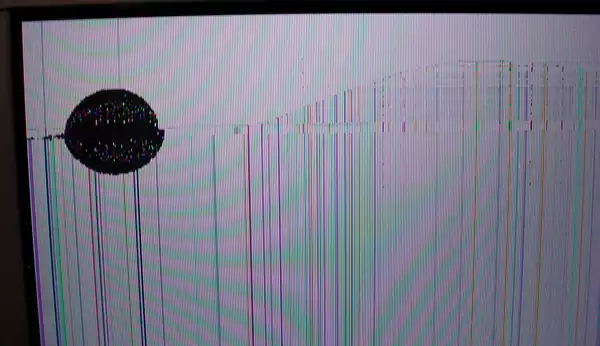
Damage to or pressure on the screen will cause pixels to fail. The majority of the time, this type of failure occurs as a result of excessive force applied to the screen as a result of either being knocked over or being closed with something inside it.
This can often create confusion, as people often think they have dirt in their screen as opposed to a dead pixel but are actually experiencing a dead pixel.
Also Read: iPhone Wallpaper Dimensions: Complete Guide to iPhone Wallpaper Size & Resolution
Are Dead Pixels Permanent?
Many might wonder whether dead pixels are permanent or can be repaired. Here’s what you need to know:
Why Dead Pixels Usually Cannot Be Repaired
The main reason that dead pixels typically can’t be fixed is that dead pixels are hardware failures, where the pixel’s transistor has actually failed, and that means that no electricity can reach the dead pixel.
Therefore, since there is no electricity reaching the dead pixel, you cannot fix this using software or pressure, so the only way to resolve this is that the pixel will continue to be dead forever.
When Screen Replacement Is Required
When there are more dead pixels than the acceptable limits or they are starting to affect the day-to-day work (reading/editing/watching) on your computer monitor, the only option is to replace it.
Many manufacturers will require you to replace your monitor panel when the number of dead pixels exceeds acceptable limits or when the number of dead pixels becomes distracting.
When you are having dead pixel issues or laptop monitor issues, it would be best to reach out to a professionals like DeviceFixes, as they can provide the best solution.
Conclusion
You now know about dead pixels. However, not every pixel issue has the same cause. Some defects can be resolved with a dead pixel tester or by cycling through the screen colors.
Unfortunately, actual dead pixels will usually remain as they are. Therefore, it’s best to identify which kind of defect is present on your screen as early as possible so that you can determine if your needs require repair or replacement of your screen by using a dead pixel detection device.
FAQs
Q: Can dead pixels actually be fixed?
Q: How do I get rid of dead pixels?
Ans: You can try pixel-fixing software, color-cycling videos, or gentle pressure, but only stuck pixels may improve, not permanently dead pixels.
Q: What causes dead pixels?
Ans: Dead pixels are caused by manufacturing defects, transistor failure, or physical screen damage, preventing pixels from receiving power and displaying any color.
Q: Should I worry about dead pixels?
Ans: A few dead pixels are normal and harmless, but multiple visible ones can affect the viewing experience and may require screen replacement eventually.
Q: How much does it cost to fix dead pixels?
Ans: Fixing usually means screen replacement, costing anywhere from moderate to expensive depending on device type, display quality, and manufacturer repair policies.
SOURCE:
What are Dead Pixels and How to Fix by Lenovo